Performance Co-Pilot™ User’s and Administrator’s Guide
About This Guide
This guide describes the Performance Co-Pilot (PCP) performance analysis toolkit. PCP provides a systems-level suite of tools that cooperate to deliver distributed performance monitoring and performance management services spanning hardware platforms, operating systems, service layers, database internals, user applications and distributed architectures.
PCP is a cross-platform, open source software package - customizations, extensions, source code inspection, and tinkering in general is actively encouraged.
“About This Guide” includes short descriptions of the chapters in this book, directs you to additional sources of information, and explains typographical conventions.
What This Guide Contains
This guide contains the following chapters:
- Introduction to PCP, provides an introduction, a brief overview of the software components, and conceptual foundations of the PCP software.
- Installing and Configuring Performance Co-Pilot, describes the basic installation and configuration steps necessary to get PCP running on your systems.
- Common Conventions and Arguments, describes the user interface components that are common to most of the text-based utilities that make up the monitor portion of PCP.
- Monitoring System Performance, describes the performance monitoring tools available in Performance Co-Pilot (PCP).
- Performance Metrics Inference Engine, describes
the Performance Metrics Inference Engine (
pmie) tool that provides automated monitoring of, and reasoning about, system performance within the PCP framework. - Archive Logging, covers the PCP services and utilities that support archive logging for capturing accurate historical performance records.
- Performance Co-Pilot Deployment Strategies, presents the various options for deploying PCP functionality across cooperating systems.
- Customizing and Extending PCP Services, describes the procedures necessary to ensure that the PCP configuration is customized in ways that maximize the coverage and quality of performance monitoring and management services.
- Acronyms, provides a comprehensive list of the acronyms used in this guide and in the man pages for Performance Co-Pilot.
Audience for This Guide
This guide is written for the system administrator or performance analyst who is directly using and administering PCP applications.
Man Pages
The operating system man pages provide concise reference information on the use of commands, subroutines, and system resources. There is usually a man page for each PCP command or subroutine. To see a list of all the PCP man pages, start from the following command:
man PCPIntro
Each man page usually has a “SEE ALSO” section, linking to other, related entries.
To see a particular man page, supply its name to the man command,
for example:
man pcp
The man pages are arranged in different sections - user commands, programming interfaces, and so on. For a complete list of manual sections on a platform enter the command:
man man
When referring to man pages, this guide follows a standard convention:
the section number in parentheses follows the item. For example,
pminfo(1) refers to the man page in section 1 for the pminfo
command.
Web Site
The following web site is accessible to everyone:
- URL
- Description
- https://pcp.io
- PCP is open source software released under the GNU General Public License (GPL) and GNU Lesser General Public License (LGPL)
Conventions
The following conventions are used throughout this document:
- Convention
- Meaning
${PCP_VARIABLE}- A brace-enclosed all-capital-letters syntax indicates a variable that
has been sourced from the global
${PCP_DIR}/etc/pcp.conffile. These special variables indicate parameters that affect all PCP commands, and are likely to be different between platforms. command- This fixed-space font denotes literal items such as commands, files, routines, path names, signals, messages, and programming language structures.
- variable
- Italic typeface denotes variable entries and words or concepts being defined.
user input- This bold, fixed-space font denotes literal items that the user enters in interactive sessions. (Output is shown in nonbold, fixed-space font.)
- [ ]
- Brackets enclose optional portions of a command or directive line.
- …
- Ellipses indicate that a preceding element can be repeated.
- ALL CAPS
- All capital letters denote environment variables, operator names, directives, defined constants, and macros in C programs.
- ()
- Parentheses that follow function names surround function arguments or are empty if the function has no arguments; parentheses that follow commands surround man page section numbers.
Introduction to PCP
This chapter provides an introduction to Performance Co-Pilot (PCP), an overview of its individual components, and conceptual information to help you use this software.
The following sections are included:
- Objectives covers the intended purposes of PCP.
- Overview of Component Software, describes PCP tools and agents.
- Conceptual Foundations, discusses the design theories behind PCP.
Objectives
Performance Co-Pilot (PCP) provides a range of services that may be used to monitor and manage system performance. These services are distributed and scalable to accommodate the most complex system configurations and performance problems.
PCP Target Usage
PCP is targeted at the performance analyst, benchmarker, capacity planner, developer, database administrator, or system administrator with an interest in overall system performance and a need to quickly isolate and understand performance behavior, resource utilization, activity levels, and bottlenecks in complex systems. Platforms that can benefit from this level of performance analysis include large servers, server clusters, or multiserver sites delivering Database Management Systems (DBMS), compute, Web, file, or video services.
Empowering the PCP User
To deal efficiently with the dynamic behavior of complex systems, performance analysts need to filter out noise from the overwhelming stream of performance data, and focus on exceptional scenarios. Visualization of current and historical performance data, and automated reasoning about performance data, effectively provide this filtering.
From the PCP end user’s perspective, PCP presents an integrated suite of tools, user interfaces, and services that support real-time and retrospective performance analysis, with a bias towards eliminating mundane information and focusing attention on the exceptional and extraordinary performance behaviors. When this is done, the user can concentrate on in-depth analysis or target management procedures for those critical system performance problems.
Unification of Performance Metric Domains
At the lowest level, performance metrics are collected and managed in autonomous performance domains such as the operating system kernel, a DBMS, a layered service, or an end-user application. These domains feature a multitude of access control policies, access methods, data semantics, and multiversion support. All this detail is irrelevant to the developer or user of a performance monitoring tool, and is hidden by the PCP infrastructure.
PMDAunificationPerformance Metrics Domain Agent PMDAPerformance Metrics Domain Agents (PMDAs) within PCP encapsulate the knowledge about, and export performance information from, autonomous performance domains.
Uniform Naming and Access to Performance Metrics
Usability and extensibility of performance management tools mandate a single scheme for naming performance metrics. The set of defined names constitutes a Performance Metrics Name Space (PMNS). Within PCP, the PMNS is adaptive so it can be extended, reshaped, and pruned to meet the needs of particular applications and users.
PCP provides a single interface to name and retrieve values for all performance metrics, independently of their source or location.
PCP Distributed Operation
From a purely pragmatic viewpoint, a single workstation must be able to monitor the concurrent performance of multiple remote hosts. At the same time, a single host may be subject to monitoring from multiple remote workstations.
These requirements suggest a classic client-server architecture, which is exactly what PCP uses to provide concurrent and multiconnected access to performance metrics, independent of their host location.
Dynamic Adaptation to Change
Complex systems are subject to continual changes as network connections fail and are reestablished; nodes are taken out of service and rebooted; hardware is added and removed; and software is upgraded, installed, or removed. Often these changes are asynchronous and remote (perhaps in another geographic region or domain of administrative control).
The distributed nature of the PCP (and the modular fashion in which performance metrics domains can be installed, upgraded, and configured on different hosts) enables PCP to adapt concurrently to changes in the monitored system(s). Variations in the available performance metrics as a consequence of configuration changes are handled automatically and become visible to all clients as soon as the reconfigured host is rebooted or the responsible agent is restarted.
PCP also detects loss of client-server connections, and most clients support subsequent automated reconnection.
Logging and Retrospective Analysis
A range of tools is provided to support flexible, adaptive logging of performance metrics for archive, playback, remote diagnosis, and capacity planning. PCP archive logs may be accumulated either at the host being monitored, at a monitoring workstation, or both.
A universal replay mechanism, modeled on media controls, supports play, step, rewind, fast forward and variable speed processing of archived performance data. Replay for multiple archives, from multiple hosts, is facilitated by an archive aggregation concept.
Most PCP applications are able to process archive logs and real-time performance data with equal facility. Unification of real-time access and access to the archive logs, in conjunction with the media controls, provides powerful mechanisms for building performance tools and to review both current and historical performance data.
Automated Operational Support
For operational and production environments, PCP provides a framework with scripts to customize in order to automate the execution of ongoing tasks such as these:
- centralized archive loggingCentralized archive logging for multiple remote hosts
- archive logscustomizationArchive log rotation, consolidation, and culling
- Web-based publishing of charts showing snapshots of performance activity levels in the recent past
- Flexible alarm monitoring: parameterized rules to address common critical performance scenarios and facilities to customize and refine this monitoring
- auditsRetrospective performance audits covering the recent past; for example, daily or weekly checks for performance regressions or quality of service problems
PCP Extensibility
PCP permits the integration of new performance metrics into the PMNS, the collection infrastructure, and the logging framework. The guiding principle is, “if it is important for monitoring system performance, and you can measure it, you can easily integrate it into the PCP framework.”
For many PCP users, the most important performance metrics are not those already supported, but new performance metrics that characterize the essence of good or bad performance at their site, or within their particular application environment.
One example is an application that measures the round-trip time for a benign “probe” transaction against some mission-critical application.
For application developers, a library is provided to support easy-to-use insertion of trace and monitoring points within an application, and the automatic export of resultant performance data into the PCP framework. Other libraries and tools aid the development of customized and fully featured Performance Metrics Domain Agents (PMDAs).
Extensive source code examples are provided in the distribution, and by using the PCP toolkit and interfaces, these customized measures of performance or quality of service can be easily and seamlessly integrated into the PCP framework.
Metric Coverage
The core PCP modules support export of performance metrics that include kernel instrumentation, hardware instrumentation, process-level resource utilization, database and other system services instrumentation, and activity in the PCP collection infrastructure.
The supplied agents support thousands of distinct performance metrics, many of which can have multiple values, for example, per disk, per CPU, or per process.
Conceptual Foundations
The following sections provide a detailed overview of concepts that underpin Performance Co-Pilot (PCP).
Performance Metrics
Across all of the supported performance metric domains, there are a large number of performance metrics. Each metric has its own structure and semantics. PCP presents a uniform interface to these metrics, independent of the underlying metric data source.
The Performance Metrics Name Space (PMNS) provides a hierarchical classification of human-readable metric names, and a mapping from these external names to internal metric identifiers. See Performance Metrics Name Space, for a description of the PMNS.
Performance Metric Instances
When performance metric values are returned to a requesting application, there may be more than one value instance for a particular metric; for example, independent counts for each CPU, process, disk, or local filesystem. Internal instance identifiers correspond one to one with external (human-readable) descriptions of the members of an instance domain.
Transient performance metrics (such as per-process information) cause repeated requests for the same metric to return different numbers of values, or changes in the particular instance identifiers returned. These changes are expected and fully supported by the PCP infrastructure; however, metric instantiation is guaranteed to be valid only at the time of collection.
Current Metric Context
When performance metrics are retrieved, they are delivered in the context of a particular source of metrics, a point in time, and a profile of desired instances. This means that the application making the request has already negotiated to establish the context in which the request should be executed.
A metric source may be the current
performance data from a particular host (a live or real-time source), or
a set of archive logs of performance data collected by pmlogger at
some distant host or at an earlier time (a retrospective or archive
source).
By default, the collection time for a performance metric is the current time of day for real-time sources, or current point within an archive source. For archives, the collection time may be reset to an arbitrary time within the bounds of the set of archive logs.archive logs collection time
Sources of Performance Metrics and Their Domains
Instrumentation for the purpose of performance monitoring typically consists of counts of activity or events, attribution of resource consumption, and service-time or response-time measures. This instrumentation may exist in one or more of the functional domains as shown in figure_title.
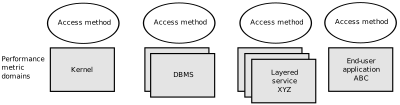
Performance Metric Domains as Autonomous Collections of Data
Each domain has an associated access method:
- Kernel data structuresThe operating system kernel, including sub-system data structures - per-process resource consumption, network statistics, disk activity, or memory management instrumentation.
- Mail serverslayered software servicesA layered software service such as activity logs for a World Wide Web server or an email delivery server.application programs
- An application program such as measured response time for a production application running a periodic and benign probe transaction (as often required in service level agreements), or rate of computation and throughput in jobs per minute for a batch stream.
- network routers and bridgesexternal equipmentExternal equipment such as network routers and bridges.
For each domain, the set of performance metrics may be viewed as an abstract data type, with an associated set of methods that may be used to perform the following tasks:
- Interrogate the metadata that describes the syntax and semantics of the performance metrics
- Control (enable or disable) the collection of some or all of the metrics
- Extract instantiations (current values) for some or all of the metrics
We refer to each functional domain as a performance metrics domain and assume that domains are functionally, architecturally, and administratively independent and autonomous. Obviously the set of performance metrics domains available on any host is variable, and changes with time as software and hardware are installed and removed.
The number of performance metrics domains may be further enlarged in cluster-based or network-based configurations, where there is potentially an instance of each performance metrics domain on each node. Hence, the management of performance metrics domains must be both extensible at a particular host and distributed across a number of hosts.
Each performance metrics domain on a particular host must be assigned a unique Performance Metric Identifier (PMID). In practice, this means unique identifiers are assigned globally for each performance metrics domain type. For example, the same identifier would be used for the Apache Web Server performance metrics domain on all hosts.
Distributed Collection
The performance metrics collection architecture is distributed, in the sense that any performance tool may be executing remotely. However, a PMDA usually runs on the system for which it is collecting performance measurements. In most cases, connecting these tools together on the collector host is the responsibility of the PMCD process, as shown in figure_title.

Process Structure for Distributed Operation
The host running the monitoring tools does not require any collection
tools, including pmcd, because all requests for metrics are sent to
the pmcd process on the collector host. These requests are then
forwarded to the appropriate PMDAs, which respond with metric
descriptions, help text, and most importantly, metric values.
The connections between monitor clients and
pmcd processes are managed in libpcp, below the PMAPI level; see
the pmapi(3) man page. Connections between PMDAs and pmcd are
managed by the PMDA routines; see the pmda(3) man page. There can be
multiple monitor clients and multiple PMDAs on the one host, but
normally there would be only one pmcd process.
Performance Metrics Name Space
Internally, each unique performance metric is identified by a Performance Metric Identifier (PMID) drawn from a universal set of identifiers, including some that are reserved for site-specific, application-specific, and customer-specific use.
An external name space - the Performance Metrics Name Space (PMNS) - maps from a hierarchy (or tree) of human-readable names to PMIDs.
Performance Metrics Name Space Diagram
Each node in the PMNS tree is assigned a label that must begin with an
alphabet character, and be followed by zero or more alphanumeric
characters or the underscore (_) character. The root node of the tree
has the special label of root.
A metric name is formed by traversing the tree from the root to a leaf
node with each node label on the path separated by a period. The common
prefix root. is omitted from all names. For example,
figure_title shows the nodes in a small subsection of a
PMNS.
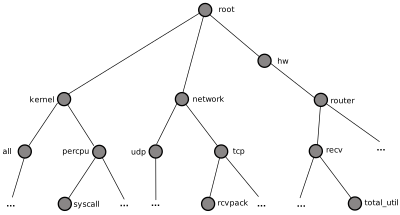
Small Performance Metrics Name Space (PMNS)
In this subsection, the following are valid names for performance metrics:
kernel.percpu.syscall
network.tcp.rcvpack
hw.router.recv.total_util
Descriptions for Performance Metrics
Through the various performance metric domains, the PCP must support a wide range of formats and semantics for performance metrics. This metadata describing the performance metrics includes the following:
- The internal identifier, Performance Metric Identifier (PMID), for the metric
- 64-bit IEEE formatThe format and encoding for the values of the metric, for example, an unsigned 32-bit integer or a string or a 64-bit IEEE format floating point number
- The semantics of the metric, particularly the interpretation of the values as free-running counters or instantaneous values
- The dimensionality of the values, in the dimensions of events, space, and time
- The scale of values; for example, bytes, kilobytes (KB), or megabytes (MB) for the space dimension
- An indication if the metric may have one or many associated values
- Short (and extended) help text describing the metric
For each metric, this metadata is defined within the associated PMDA, and PCP arranges for the information to be exported to performance tools that use the metadata when interpreting the values for each metric.
Values for Performance Metrics
The following sections describe two types of performance metrics, single-valued and set-valued.
Single-Valued Performance Metrics
Some performance metrics have a singular value within their performance metric domains. For example, available memory (or the total number of context switches) has only one value per performance metric domain, that is, one value per host. The metadata describing the metric makes this fact known to applications that process values for these metrics.
Set-Valued Performance Metrics
Some performance metrics have a set of values or instances in each implementing performance metric domain. For example, one value for each disk, one value for each process, one value for each CPU, or one value for each activation of a given application.
When a metric has multiple instances, the PCP framework does not pollute the Name Space with additional metric names; rather, a single metric may have an associated set of values. These multiple values are associated with the members of an instance domain, such that each instance has a unique instance identifier within the associated instance domain. For example, the “per CPU” instance domain may use the instance identifiers 0, 1, 2, 3, and so on to identify the configured processors in the system.
Internally, instance identifiers are encoded as binary values, but each performance metric domain also supports corresponding strings as external names for the instance identifiers, and these names are used at the user interface to the PCP utilities.
For example, the performance metric disk.dev.total counts I/O
operations for each disk spindle, and the associated instance domain
contains one member for each disk spindle. On a system with five
specific disks, one value would be associated with each of the external
and internal instance identifier pairs shown in
Sample Instance Identifiers for Disk Statistics.
| External Instance Identifier | Internal Instance Identifier |
|---|---|
| disk0 | 131329 |
| disk1 | 131330 |
| disk2 | 131331 |
| disk3 | 131841 |
| disk4 | 131842 |
Multiple performance metrics may be associated with a single instance domain.
Each performance metric domain may dynamically establish the instances
within an instance domain. For example, there may be one instance for
the metric kernel.percpu.idle on a workstation, but multiple
instances on a multiprocessor server. Even more dynamic is
filesys.free, where the values report the amount of free space per
file system, and the number of values tracks the mounting and unmounting
of local filesystems.
PCP arranges for information describing instance domains to be exported from the performance metric domains to the applications that require this information. Applications may also choose to retrieve values for all instances of a performance metric, or some arbitrary subset of the available instances.
Collector and Monitor Roles
Hosts supporting PCP services are broadly classified into two categories:
- Collector
- collector hostsPMDAcollectorsHosts that have
pmcdand one or more performance metric domain agents (PMDAs) running to collect and export performance metrics - Monitor
- monitor hostsHosts that import performance metrics from one or more collector hosts to be consumed by tools to monitor, manage, or record the performance of the collector hosts
Each PCP enabled host can operate as a collector, a monitor, or both.
Retrospective Sources of Performance Metrics
The PMAPI also supports
delivery of performance metrics from a historical source in the form of
a PCP archive log. Archive logs are created using the pmlogger
utility, and are replayed in an architecture as shown in
figure_title.

Architecture for Retrospective Analysis
The PMAPI has been designed to minimize the differences required for an application to process performance data from an archive or from a real-time source. As a result, most PCP tools support live and retrospective monitoring with equal facility.
Product Extensibility
Much of the PCP software’s potential for attacking difficult performance problems in production environments comes from the design philosophy that considers extensibility to be critically important.
The performance analyst can take advantage of the PCP infrastructure to deploy value-added performance monitoring tools and services. Here are some examples:
- Easy extension of the PCP collector to accommodate new performance
metrics and new sources of performance metrics, in particular using
the interfaces of a special-purpose library to develop new PMDAs (see
the
pmda(3)man page) - libpcp_pmda librarylibpcp_mmv libraryUse of libraries
(
libpcp_pmdaandlibpcp_mmv) to aid in the development of new capabilities to export performance metrics from local applications - Operation on any performance metric using generalized toolkits
- Distribution of PCP components such as collectors across the network, placing the service where it can do the most good
- Dynamic adjustment to changes in system configuration
- Flexible customization built into the design of all PCP tools
- Creation of new monitor applications, using the routines described in
the
pmapi(3)man page
Overview of Component Software
Performance Co-Pilot (PCP) is composed of both
text-based and graphical tools. Each tool is fully documented by a man
page. These man pages are named after the tools or commands they
describe, and are accessible through the man command. For example,
to see the pminfo(1) man page for the pminfo command, enter this
command:
man pminfo
A representative list of PCP tools and commands, grouped by functionality, is provided in the following four sections.
Performance Monitoring and Visualization
The following tools provide the principal services for the PCP end-user with an interest in monitoring, visualizing, or processing performance information collected either in real time or from PCP archive logs:
pcp-atop- pcp-atop tool brief descriptionFull-screen monitor of the load on a
system from a kernel, hardware and processes point of view. It is
modeled on the Linux
atop(1)tool (home page) and provides a showcase for the variety of data available using PCP services and the Python scripting interfaces. pmchart- pmchart tool brief descriptionStrip chart tool for arbitrary performance metrics. Interactive graphical utility that can display multiple charts simultaneously, from multiple hosts or set of archives, aligned on a unified time axis (X-axis), or on multiple tabs.
pcp-collectl- pcp-collectl tool brief descriptionStatistics collection tool with
good coverage of a number of Linux kernel subsystems, with the
everything-in-one-tool approach pioneered by
sar(1). It is modeled on the Linuxcollectl(1)utility (home page) and provides another example of use of the Python scripting interfaces to build more complex functionality with relative ease, with PCP as a foundation. pmrep- pmrep tool brief descriptionOutputs the values of arbitrary performance metrics collected live or from a single PCP archive, in textual format.
pmevent- pmevent tool brief descriptionReports on event metrics, decoding the timestamp and event parameters for text-based reporting.
pmie- pmie tool brief descriptionEvaluates predicate-action rules over performance metrics for alarms, automated system management tasks, dynamic configuration tuning, and so on. It is an inference engine.
pmieconf- pmieconf toolbrief descriptionpmie toolpmieconf rulesCreates
parameterized rules to be used with the PCP inference engine
(
pmie). It can be run either interactively or from scripts for automating the setup of inference (the PCP start scripts do this, for example, to generate a default configuration). pminfo- pminfo tool brief descriptionDisplays information about arbitrary
performance metrics available from PCP, including help text with
-T. pmlogsummary- pmlogsummary toolCalculates and reports various statistical summaries of the performance metric values from a set of PCP archives.
pmprobe- pmprobe toolProbes for performance metric availability, values, and instances.
pmstat- pmstat tool brief descriptionProvides a text-based display of metrics that summarize the performance of one or more systems at a high level.
pmval- pmval tool brief descriptionProvides a text-based display of the values for arbitrary instances of a selected performance metric, suitable for ASCII logs or inquiry over a slow link.
Collecting, Transporting, and Archiving Performance Information
PCP provides the following tools to support real-time data collection, network transport, and archive log creation services for performance data:
mkaf- mkaf toolAggregates an arbitrary collection of PCP archive logs into
a folio to be used with
pmafm. pmafm- pmafm tool brief descriptionInterrogates, manages, and replays an
archive folio as created by
mkaf, or the periodic archive log management scripts, or the record mode of other PCP tools. pmcd- PMCDbrief descriptionPerformance Metrics Collection DaemonPMCDpmcd toolPMCDIs the Performance Metrics Collection Daemon (PMCD). This daemon must run on each system being monitored, to collect and export the performance information necessary to monitor the system.
pmcd_wait- pmcd_wait toolWaits for
pmcdto be ready to accept client connections. pmdaapache- pmdaapache toolExports performance metrics from the Apache Web Server. It is a Performance Metrics Domain Agent (PMDA).
pmdacisco- pmdacisco toolExtracts performance metrics from one or more Cisco routers.
pmdaelasticseach- pmdaelasticsearch toolExtracts performance metrics from an elasticsearch cluster.
pmdagfs2- pmdagfs2 toolExports performance metrics from the GFS2 clustered filesystem.
pmdagluster- pmdagluster toolExtracts performance metrics from the Gluster filesystem.
pmdainfiniband- pmdainfiniband toolExports performance metrics from the Infiniband kernel driver.
pmdakvm- pmdakvm toolExtracts performance metrics from the Linux Kernel Virtual Machine (KVM) infrastructure.
pmdalustrecomm- pmdalustrecomm toolExports performance metrics from the Lustre clustered filesystem.
pmdamailq- pmdamailq toolExports performance metrics describing the current
state of items in the
sendmailqueue. pmdamemcache- pmdamemcache toolExtracts performance metrics from memcached, a distributed memory caching daemon commonly used to improve web serving performance.
pmdammv- pmdammv tool
Exports metrics from instrumented applications linked with the
pcp_mmvshared library or the Parfait framework for Java instrumentation. These metrics are custom developed per application, and in the case of Parfait, automatically include numerous JVM, Tomcat and other server or container statistics. pmdamysql- pmdamysql toolExtracts performance metrics from the MySQL relational database.
pmdanamed- pmdanamed toolExports performance metrics from the Internet domain name server, named.
pmdanginx- pmdanginx toolExtracts performance metrics from the nginx HTTP and reverse proxy server.
pmdapostfix- pmdapostfix toolExport performance metrics from the Postfix mail transfer agent.
pmdapostgres- pmdapostgres toolExtracts performance metrics from the PostgreSQL relational database.
pmdaproc- pmdaproc toolExports performance metrics for running processes.
pmdarsyslog- pmdarsyslog toolExtracts performance metrics from the Reliable System Log daemon.
pmdasamba- pmdasamba toolExtracts performance metrics from Samba, a Windows SMB/CIFS server.
pmdasendmail- pmdasendmail toolExports mail activity statistics from
sendmail. pmdashping- pmdashping toolExports performance metrics for the availability and quality of service (response-time) for arbitrary shell commands.
pmdasnmp- pmdasnmp toolExtracts SNMP performance metrics from local or remote SNMP-enabled devices.
pmdasummary- pmdasummary toolDerives performance metrics values from values made available by other PMDAs. It is a PMDA itself.
pmdasystemd- pmdasystemd toolExtracts performance metrics from the systemd and journald services.
pmdatrace- pmdatrace toolExports transaction performance metrics from
application processes that use the
pcp_tracelibrary. pmdavmware- pmdavmware toolExtracts performance metrics from a VMWare virtualization host.
pmdaweblog- pmdaweblog tool Scans Web-server logs to extract metrics characterizing.
pmdaxfs- pmdaxfs toolExtracts performance metrics from the Linux kernel XFS filesystem implementation.
pmdumplog- pmdumplog tool brief descriptionDisplays selected state information,
control data, and metric values from a set of PCP archive logs
created by
pmlogger. pmlc- pmlc tool brief descriptionExercises control over an instance of the
PCP archive logger
pmlogger, to modify the profile of which metrics are logged and/or how frequently their values are logged. pmlogcheck- pmlogcheck toolPerforms integrity check for individual PCP archives.
pmlogconf- pmlogconf toolCreates or modifies
pmloggerconfiguration files for many common logging scenarios, optionally probing for available metrics and enabled functionality. It can be run either interactively or from scripts for automating the setup of data logging (the PCP start scripts do this, for example, to generate a default configuration). pmlogextract- pmlogextract toolReads one or more PCP archive logs and creates a temporally merged and reduced PCP archive log as output.
pmlogger- pmlogger toolbrief descriptionCreates PCP archive logs of performance metrics over time. Many tools accept these PCP archive logs as alternative sources of metrics for retrospective analysis.
pmproxy- pmproxy tool brief descriptionProvides REST APIs, archive discovery, and both PCP and Redis protocol proxying when executing PCP or Redis client tools through a network firewall system.
pmtrace- pmtrace toolProvides a simple command line interface to the trace
PMDA and its associated
pcp_tracelibrary.
Operational and Infrastructure Support
PCP provides the following tools to support the PCP infrastructure and assist operational procedures for PCP deployment in a production environment:
pcp- pcp toolSummarizes that state of a PCP installation.
pmdbg- pmdbg facilitydiagnostic toolsdebugging toolsDescribes the available facilities and associated control flags. PCP tools include internal diagnostic and debugging facilities that may be activated by run-time flags.
pmerr- pmerr toolTranslates PCP error codes into human-readable error messages.
pmhostname- pmhostname toolReports hostname as returned by
gethostbyname. Used in assorted PCP management scripts. pmie_check- pmie toolbrief descriptionAdministration of the Performance Co-Pilot
inference engine (
pmie). pmlock- pmlock toolAttempts to acquire an exclusive lock by creating a file with a mode of 0.
pmlogger_*- pmlogger_check scriptpmlogger_daily scriptpmlogger_merge scriptpmsnap
toolbrief descriptionscriptsAllows you to create a customized regime
of administration and management for PCP archive log files. The
pmlogger_check,pmlogger_daily, andpmlogger_mergescripts are intended for periodic execution via thecroncommand. pmnewlog- pmnewlog toolPerforms archive log rotation by stopping and restarting
an instance of
pmlogger. pmnsadd- pmnsadd toolAdds a subtree of new names into a PMNS, as used by the components of PCP.
pmnsdel- pmnsdel toolRemoves a subtree of names from a PMNS, as used by the components of the PCP.
pmnsmerge- pcp toolMerges multiple PMNS files together, as used by the components of PCP.
pmstore- pmstore tool brief descriptionReinitializes counters or assigns new values to metrics that act as control variables. The command changes the current values for the specified instances of a single performance metric.
Application and Agent Development
application programsPCPtool summariesThe following PCP tools aid the development of new programs to consume performance data, and new agents to export performance data within the PCP framework:
chkhelp- chkhelp toolChecks the consistency of performance metrics help database files.
dbpmda- dbpmda toolAllows PMDA behavior to be exercised and tested. It is an interactive debugger for PMDAs.
newhelp- newhelp toolGenerates the database files for one or more source files of PCP help text.
pmapi- pmclient toolPMAPIbrief descriptionPerformance Metrics Application Programming InterfacePMAPIDefines a procedural interface for developing PCP client applications. It is the Performance Metrics Application Programming Interface (PMAPI).
pmclient- pmclient toolIs a simple client that uses the PMAPI to report some high-level system performance metrics.
pmda- dbpmda tool PMDAIs a library used by many shipped PMDAs to
communicate with a
pmcdprocess. It can expedite the development of new and custom PMDAs. pmgenmap- pmgenmap toolGenerates C declarations and
cpp(1)macros to aid the development of customized programs that use the facilities of PCP. It is a PMDA development tool.
Installing and Configuring Performance Co-Pilot
The sections in this chapter describe the basic installation and configuration steps necessary to run Performance Co-Pilot (PCP) on your systems. The following major sections are included:
- Product Structure describes the main packages of PCP software and how they must be installed on each system.
- Performance Metrics Collection Daemon (PMCD), describes the fundamentals of maintaining the performance data collector.
- Managing Optional PMDAs, describes the basics of installing a new Performance Metrics Domain Agent (PMDA) to collect metric data and pass it to the PMCD.
- Troubleshooting, offers advice on problems involving the PMCD.
Product Structure
In a typical deployment, Performance Co-Pilot (PCP) would be installed in a collector configuration on one or more hosts, from which the performance information could then be collected, and in a monitor configuration on one or more workstations, from which the performance of the server systems could then be monitored.
On some platforms Performance Co-Pilot is presented as multiple packages; typically separating the server components from graphical user interfaces and documentation.
- pcp-X.Y.Z-rev
- package for core PCP
- pcp-gui-X.Y.Z-rev
- package for graphical PCP client tools
- pcp-doc-X.Y.Z-rev
- package for online PCP documentation
Performance Metrics Collection Daemon (PMCD)
On each Performance Co-Pilot (PCP) collection system, you must be certain that
the pmcd daemon is running. This daemon coordinates the gathering
and exporting of performance statistics in response to requests from the
PCP monitoring tools.
Starting and Stopping the PMCD
To start the daemon, enter the following
commands as root on each PCP collection system:
chkconfig pmcd on
${PCP_RC_DIR}/pmcd start
These commands instruct the system to start the daemon immediately, and again whenever the system is booted. It is not necessary to start the daemon on the monitoring system unless you wish to collect performance information from it as well.
To stop pmcd immediately on a PCP collection system, enter the
following command:
${PCP_RC_DIR}/pmcd stop
Restarting an Unresponsive PMCD
Sometimes, if a daemon is not responding on a PCP collection system, the
problem can be resolved by stopping and then immediately restarting a
fresh instance of the daemon. If you need to stop and then immediately
restart PMCD on a PCP collection system, use the start argument
provided with the script in ${PCP_RC_DIR}. The command syntax is, as
follows:
${PCP_RC_DIR}/pmcd start
On startup, pmcd looks for a configuration file at
${PCP_PMCDCONF_PATH}. This file specifies which agents cover which
performance metrics domains and how PMCD should make contact with the
agents. A comprehensive description of the configuration file syntax and
semantics can be found in the pmcd(1) man page.
If the configuration is changed, pmcd reconfigures itself when it
receives the SIGHUP signal. Use the following command to send the
SIGHUP signal to the daemon:
${PCP_BINADM_DIR}/pmsignal -a -s HUP pmcd
This is also useful when one of the PMDAs managed by pmcd has failed
or has been terminated by pmcd. Upon receipt of the SIGHUP
signal, pmcd restarts any PMDA that is configured but inactive. The
exception to this rule is the case of a PMDA which must run with
superuser privileges (where possible, this is avoided) - for these
PMDAs, a full pmcd restart must be performed, using the process
described earlier (not SIGHUP).
PMCD Diagnostics and Error Messages
If there is a problem with pmcd,
the first place to investigate should be the pmcd.log file. By
default, this file is in the ${PCP_LOG_DIR}/pmcd directory.
PMCD Options and Configuration Files
There are two files that control PMCD operation.
These are the ${PCP_PMCDCONF_PATH} and ${PCP_PMCDOPTIONS_PATH}
files. The pmcd.options file contains the command line options used
with PMCD; it is read when the daemon is invoked by
${PCP_RC_DIR}/pmcd. The pmcd.conf file contains configuration
information regarding domain agents and the metrics that they monitor.
These configuration files are described in the following sections.
The pmcd.options File
Command line options for the PMCD are stored in the
${PCP_PMCDOPTIONS_PATH} file. The PMCD can be invoked directly from
a shell prompt, or it can be invoked by`` ${PCP_RC_DIR}/pmcd`` as part
of the boot process. It is usual and normal to invoke it using
${PCP_RC_DIR}/pmcd, reserving shell invocation for debugging
purposes.
The PMCD accepts certain command line options to control its execution,
and these options are placed in the pmcd.options file when
${PCP_RC_DIR}/pmcd is being used to start the daemon. The following
options (amongst others) are available:
-iaddress- For hosts with more than one network interface, this option specifies
the interface on which this instance of the PMCD accepts connections.
Multiple
-ioptions may be specified. The default in the absence of any-ioption is for PMCD to accept connections on all interfaces. -lfile- Specifies a log file. If no
-loption is specified, the log file name ispmcd.logand it is created in the directory${PCP_LOG_DIR}/pmcd/. -sfile- Specifies the path to a local unix domain socket (for platforms
supporting this socket family only). The default value is
${PCP_RUN_DIR}/pmcd.socket. -tsecondsPDUprotocol data unitsPDUSpecifies the amount of time, in seconds, before PMCD times out on protocol data unit (PDU) exchanges with PMDAs. If no time out is specified, the default is five seconds. Setting time out to zero disables time outs (not recommended, PMDAs should always respond quickly).
The time out may be dynamically modified by storing the number of seconds into the metric
pmcd.control.timeoutusingpmstore.-Tmask- Specifies whether connection and PDU tracing are turned on for debugging purposes.
See the pmcd(1) man page for complete information on these options.
The default pmcd.options file shipped with PCP is similar to the
following:
# command-line options to pmcd, uncomment/edit lines as required

# longer timeout delay for slow agents
# -t 10

# suppress timeouts
# -t 0

# make log go someplace else
# -l /some/place/else

# debugging knobs, see pmdbg(1)
# -D N
# -f

# Restricting (further) incoming PDU size to prevent DOS attacks
# -L 16384

# enable event tracing bit fields
#   1   trace connections
#   2   trace PDUs
# 256   unbuffered tracing
# -T 3

# setting of environment variables for pmcd and
# the PCP rc scripts. See pmcd(1) and PMAPI(3).
# PMCD_WAIT_TIMEOUT=120
The most commonly used options have been placed in this file for your
convenience. To uncomment and use an option, simply remove the pound
sign (#) at the beginning of the line with the option you wish to use.
Restart pmcd for the change to take effect; that is, as superuser,
enter the command:
${PCP_RC_DIR}/pmcd start
The pmcd.conf File
When the PMCD is invoked, it reads its configuration file,
which is ${PCP_PMCDCONF_PATH}. This file contains entries that
specify the PMDAs used by this instance of the PMCD and which metrics
are covered by these PMDAs. Also, you may specify access control rules
in this file for the various hosts, users and groups on your network.
This file is described completely in the pmcd(1) man page.
With standard PCP operation (even if you have not created and added your
own PMDAs), you might need to edit this file in order to add any
additional access control you wish to impose. If you do not add access
control rules, all access for all operations is granted to the local
host, and read-only access is granted to remote hosts. The pmcd.conf
file is automatically generated during the software build process and on
Linux, for example, is similar to the following:
 Performance Metrics Domain Specifications
#
# This file is automatically generated during the build
# Name  Id      IPC     IPC Params      File/Cmd
root    1   pipe    binary      /var/lib/pcp/pmdas/root/pmdaroot
pmcd    2       dso     pmcd_init       ${PCP_PMDAS_DIR}/pmcd/pmda_pmcd.so
proc    3       pipe    binary          ${PCP_PMDAS_DIR}/proc/pmdaproc -d 3
xfs     11      pipe    binary          ${PCP_PMDAS_DIR}/xfs/pmdaxfs -d 11
linux   60      dso     linux_init      ${PCP_PMDAS_DIR}/linux/pmda_linux.so
mmv 70  dso mmv_init    /var/lib/pcp/pmdas/mmv/pmda_mmv.so

[access]
disallow ".*" : store;
disallow ":*" : store;
allow "local:*" : all;
Note
Even though PMCD does not run with
rootprivileges, you must be very careful not to configure PMDAs in this file if you are not sure of their action. This is because all PMDAs are initially started asroot(allowing them to assume alternate identities, such aspostgresfor example), after whichpmcddrops its privileges. Pay close attention that permissions on this file are not inadvertently downgraded to allow public write access.
Each entry in this configuration file contains rules that specify how to connect the PMCD to a particular PMDA and which metrics the PMDA monitors. A PMDA may be attached as a Dynamic Shared Object (DSO) or by using a socket or a pair of pipes. The distinction between these attachment methods is described below.
An entry in the pmcd.conf file looks like this:
label_name domain_number type path
The label_name field specifies a name for the PMDA. The domain_number is an integer value that specifies a domain of metrics for the PMDA. The type field indicates the type of entry (DSO, socket, or pipe). The path field is for additional information, and varies according to the type of entry.
The following rules are common to DSO, socket, and pipe syntax:
- label_name
- An alphanumeric string identifying the agent.
- domain_number
- An unsigned integer specifying the agent’s domain.
DSO entries follow this syntax:
label_name domain_number dso entry-point path The following rules apply to the DSO syntax:
dso- The entry type.
- entry-point
- The name of an initialization function called when the DSO is loaded.
- path
- Designates the location of the DSO. An absolute path must be used. On
most platforms this will be a
sosuffixed file, on Windows it is adll, and on Mac OS X it is adylibfile.
Socket entries in the pmcd.conf file follow this syntax:
label_name domain_number socket addr_family address command args The following rules apply to the socket syntax:
socket- The entry type.
- addr_family
- Specifies if the socket is
AF_INET,AF_IPV6orAF_UNIX. If the socket isINET, the wordinetappears in this place. If the socket isIPV6, the wordipv6appears in this place. If the socket isUNIX, the wordunixappears in this place. - address
- Specifies the address of the socket. For INET or IPv6 sockets, this is a port number or port name. For UNIX sockets, this is the name of the PMDA’s socket on the local host.
- command
- Specifies a command to start the PMDA when the PMCD is invoked and reads the configuration file.
- args
- Optional arguments for command.
Pipe entries in the pmcd.conf file follow this syntax:
label_name domain_number pipe protocol command args The following rules apply to the pipe syntax:
pipe- The entry type.
- protocol
- Specifies whether a text-based or a binary PCP protocol should be used over the pipes. Historically, this parameter was able to be “text” or “binary.” The text-based protocol has long since been deprecated and removed, however, so nowadays “binary” is the only valid value here.
- command
- Specifies a command to start the PMDA when the PMCD is invoked and reads the configuration file.
- args
- Optional arguments for command.
Controlling Access to PMCD with pmcd.conf
pmcd.conf fileYou can place this option extension in the pmcd.conf
file to control access to performance metric data based on hosts, users
and groups. To add an access control section, begin by placing the
following line at the end of your pmcd.conf file:
[access]
Below this line, you can add entries of the following forms:
allow hosts hostlist : operations ;   disallow hosts hostlist : operations ;
allow users userlist : operations ;   disallow users userlist : operations ;
allow groups grouplist : operations ;   disallow groups grouplist : operations ;
The keywords users, groups and hosts can be used in either plural or singular form.
The userlist and grouplist fields are comma-separated lists of
authenticated users and groups from the local /etc/passwd and
/etc/groups files, NIS (network information service) or LDAP
(lightweight directory access protocol) service.
The hostlist is a comma-separated list of host identifiers; the following rules apply:
- Host names must be in the local system’s
/etc/hostsfile or known to the local DNS (domain name service). - IP and IPv6 addresses may be given in the usual numeric notations.
- A wildcarded IP or IPv6 address may be used to specify groups of hosts, with the single wildcard character * as the last-given component of the address. The wildcard .* refers to all IP (IPv4) addresses. The wildcard :* refers to all IPv6 addresses. If an IPv6 wildcard contains a :: component, then the final * refers to the final 16 bits of the address only, otherwise it refers to the remaining unspecified bits of the address.
The wildcard ``*’’ refers to all users, groups or host addresses. Names of users, groups or hosts may not be wildcarded.
For example, the following hostlist entries are all valid:
babylon
babylon.acme.com
123.101.27.44
localhost
155.116.24.*
192.*
.*
fe80::223:14ff:feaf:b62c
fe80::223:14ff:feaf:*
fe80:*
:*
*
The operations field can be any of the following:
- A comma-separated list of the operation types described below.
- The word all to allow or disallow all operations as specified in the first field.
- The words all except and a list of operations. This entry allows or disallows all operations as specified in the first field except those listed.
- The phrase maximum N connections to set an upper bound (N) on the number of connections an individual host, user or group of users may make. This can only be added to the operations list of an allow statement.
The operations that can be allowed or disallowed are as follows:
fetch- Allows retrieval of information from the PMCD. This may be information about a metric (such as a description, instance domain, or help text) or an actual value for a metric.
store- Allows the PMCD to store metric values in PMDAs that permit store operations. Be cautious in allowing this operation, because it may be a security opening in large networks, although the PMDAs shipped with the PCP package typically reject store operations, except for selected performance metrics where the effect is benign.
For example, here is a sample access control portion of a
${PCP_PMCDCONF_PATH} file:
allow hosts babylon, moomba : all ;
disallow user sam : all ;
allow group dev : fetch ;
allow hosts 192.127.4.* : fetch ;
disallow host gate-inet : store ;
Complete information on access control syntax rules in the pmcd.conf
file can be found in the pmcd(1) man page.
Managing Optional PMDAs
Performance Metrics Domain Agents
(PMDAs) shipped with Performance Co-Pilot (PCP) are designed to be
installed and activated on every collector host, for example, linux,
windows, darwin, pmcd, and process PMDAs.
Other PMDAs are designed for optional activation and require some user action to make them operational. In some cases these PMDAs expect local site customization to reflect the operational environment, the system configuration, or the production workload. This customization is typically supported by interactive installation scripts for each PMDA.
Each PMDA has its own directory located below ${PCP_PMDAS_DIR}. Each
directory contains a Remove script to unconfigure the PMDA, remove
the associated metrics from the PMNS, and restart the pmcd daemon;
and an Install script to install the PMDA, update the PMNS, and
restart the PMCD daemon.
As a shortcut mechanism to support automated PMDA installation, a file
named .NeedInstall can be created in a PMDA directory below
${PCP_PMDAS_DIR}. The next restart of PCP services will invoke that
PMDAs installation automatically, with default options taken.
PMDA Installation on a PCP Collector Host
To install a PMDA you must perform a collector installation for each host on which the PMDA is required to export performance metrics. PCP provides a distributed metric namespace (PMNS) and metadata, so it is not necessary to install PMDAs (with their associated PMNS) on PCP monitor hosts.
You need to update the PMNS, configure the PMDA, and
notify PMCD. The Install script for each PMDA automates these
operations, as follows:
Log in as
root(the superuser).Change to the PMDA’s directory as shown in the following example:
cd ${PCP_PMDAS_DIR}/ciscoPMDPerformance Metrics DomainPMDIn the unlikely event that you wish to use a non-default Performance Metrics Domain (PMD) assignment, determine the current PMD assignment:
cat domain.h
${PCP_VAR_DIR}/pmns/stdpmid file${PCP_PMCDCONF_PATH} fileCheck that there is no conflict in the PMDs as defined in
${PCP_VAR_DIR}/pmns/stdpmidand the other PMDAs currently in use (listed in${PCP_PMCDCONF_PATH}). Editdomain.hto assign the new domain number if there is a conflict (this is highly unlikely to occur in a regular PCP installation).Enter the following command:
./Install
You may be prompted to enter some local parameters or configuration options. The script applies all required changes to the control files and to the PMNS, and then notifies PMCD. example_title is illustrative of the interactions:
Cisco hostname or IP address? [return to quit] wanmelb

A user-level password may be required for Cisco “show int” command.
    If you are unsure, try the command
        $ telnet wanmelb
    and if the prompt “Password:” appears, a user-level password is
    required; otherwise answer the next question with an empty line.

User-level Cisco password? ********
Probing Cisco for list of interfaces ...

Enter interfaces to monitor, one per line in the format
tX where “t” is a type and one of “e” (Ethernet), or “f” (Fddi), or
“s” (Serial), or “a” (ATM), and “X” is an interface identifier
which is either an integer (e.g.  4000 Series routers) or two
integers separated by a slash (e.g. 7000 Series routers).

The currently unselected interfaces for the Cisco “wanmelb” are:
    e0 s0 s1
Enter “quit” to terminate the interface selection process.
Interface? [e0] s0

The currently unselected interfaces for the Cisco “wanmelb” are:
       e0 s1
Enter “quit” to terminate the interface selection process.
Interface? [e0] s1

The currently unselected interfaces for the Cisco “wanmelb” are:
    e0
Enter “quit” to terminate the interface selection process.
Interface? [e0] quit

Cisco hostname or IP address? [return to quit]
Updating the Performance Metrics Name Space (PMNS) ...
Installing pmchart view(s) ...
Terminate PMDA if already installed ...
Installing files ...
Updating the PMCD control file, and notifying PMCD ...
Check cisco metrics have appeared ... 5 metrics and 10 values
PMDA Removal on a PCP Collector Host
To remove a PMDA, you must perform a collector removal for each host on which the PMDA is currently installed.
The PMNS needs to be updated, the PMDA unconfigured, and PMCD notified.
The Remove script for each PMDA automates these operations, as
follows:
Log in as
root(the superuser).Change to the PMDA’s directory as shown in the following example:
cd ${PCP_PMDAS_DIR}/elasticsearchEnter the following command:
./Remove
The following output illustrates the result:
Culling the Performance Metrics Name Space ...
elasticsearch ... done
Updating the PMCD control file, and notifying PMCD ...
Removing files ...
Check elasticsearch metrics have gone away ... OK
Troubleshooting
The following sections offer troubleshooting advice on the Performance Metrics Name Space (PMNS), missing and incomplete values for performance metrics, kernel metrics and the PMCD.
Advice for troubleshooting the archive logging system is provided in Archive Logging.
Performance Metrics Name Space
To display the active
PMNS, use the pminfo command; see the pminfo(1) man page.
The PMNS at the collector host is updated whenever a PMDA is installed
or removed, and may also be updated when new versions of PCP are
installed. During these operations, the PMNS is typically updated by
merging the (plaintext) namespace components from each installed PMDA.
These separate PMNS components reside in the ${PCP_VAR_DIR}/pmns
directory and are merged into the root file there.
Missing and Incomplete Values for Performance Metrics
Missing or incomplete performance metric values are the result of their unavailability.
Metric Values Not Available
The following symptom has a known cause and resolution:
- Symptom:
- Values for some or all of the instances of a performance metric are not available.
- Cause:
This can occur as a consequence of changes in the installation of modules (for example, a DBMS or an application package) that provide the performance instrumentation underpinning the PMDAs. Changes in the selection of modules that are installed or operational, along with changes in the version of these modules, may make metrics appear and disappear over time.
In simple terms, the PMNS contains a metric name, but when that metric is requested, no PMDA at the collector host supports the metric.
For archive logs, the collection of metrics to be logged is a subset of the metrics available, so utilities replaying from a PCP archive log may not have access to all of the metrics available from a live (PMCD) source.
- Resolution:
- Make sure the underlying instrumentation is available and the module is active. Ensure that the PMDA is running on the host to be monitored. If necessary, create a new archive log with a wider range of metrics to be logged.
Kernel Metrics and the PMCD
The following issues involve the kernel metrics and the PMCD:
- Cannot connect to remote PMCD
- PMCD not reconfiguring after hang-up
- PMCD does not start
Cannot Connect to Remote PMCD
The following symptom has a known cause and resolution:
- Symptom:
- pmchart toolremote PMCDpmie toolremote PMCDpmlogger tool remote PMCDA
PCP client tool (such as
pmchart,pmie, orpmlogger) complains that it is unable to connect to a remote PMCD (or establish a PMAPI context), but you are sure that PMCD is active on the remote host. - Cause:
TCP/IPremote PMCDTo avoid hanging applications for the duration of TCP/IP time outs, the PMAPI library implements its own time out when trying to establish a connection to a PMCD. If the connection to the host is over a slow network, then successful establishment of the connection may not be possible before the time out, and the attempt is abandoned.
Alternatively, there may be a firewall in-between the client tool and PMCD which is blocking the connection attempt.
Finally, PMCD may be running in a mode where it does not acept remote connections, or only listening on certain interface.
- Resolution:
Establish that the PMCD on far-away-host is really alive, by connecting to its control port (TCP port number 44321 by default):
telnet far-away-host 44321This response indicates the PMCD is not running and needs restarting:
Unable to connect to remote host: Connection refused
To restart the PMCD on that host, enter the following command:
${PCP_RC_DIR}/pmcd startThis response indicates the PMCD is running:Connected to far-away-host
PMCD_CONNECT_TIMEOUT variableInterrupt the
telnetsession, increase the PMAPI time out by setting thePMCD_CONNECT_TIMEOUTenvironment variable to some number of seconds (60 for instance), and try the PCP client tool again.Verify that PMCD is not running in local-only mode, by looking for an enabled value (one) from:
pminfo -f pmcd.feature.localThis setting is controlled from the
PMCD_LOCALenvironment variable usually set via${PCP_SYSCONFIG_DIR}/pmcd.If these techniques are ineffective, it is likely an intermediary firewall is blocking the client from accessing the PMCD port - resolving such issues is firewall-host platform-specific and cannot practically be covered here.
PMCD Not Reconfiguring after SIGHUP
The following symptom has a known cause and resolution:
- Symptom
- PMCD does not reconfigure itself after receiving the
SIGHUPsignal. - Cause:
- pmcd.conf fileIf there is a syntax error in
${PCP_PMCDCONF_PATH}, PMCD does not use the contents of the file. This can lead to situations in which the configuration file and PMCD’s internal state do not agree. - Resolution:
- Always monitor PMCD’s log. For example, use the following command in
another window when reconfiguring PMCD, to watch errors
occur:
tail -f ${PCP_LOG_DIR}/pmcd/pmcd.log
PMCD Does Not Start
PMCDnot startingThe following symptom has a known cause and resolution:
- Symptom:
${PCP_LOGDIR}/pmcd/pmcd.log file If the following messages appear in the PMCD log (
${PCP_LOG_DIR}/pmcd/pmcd.log), consider the cause and resolution:pcp[27020] Error: OpenRequestSocket(44321) bind: Address already in use pcp[27020] Error: pmcd is already running pcp[27020] Error: pmcd not started due to errors!
- Cause:
- PMCD is already running or was terminated before it could clean up properly. The error occurs because the socket it advertises for client connections is already being used or has not been cleared by the kernel.
- Resolution:
Start PMCD as
root(superuser) by typing:${PCP_RC_DIR}/pmcd startAny existing PMCD is shut down, and a new one is started in such a way that the symptomatic message should not appear.
If you are starting PMCD this way and the symptomatic message appears, a problem has occurred with the connection to one of the deceased PMCD’s clients.
This could happen when the network connection to a remote client is lost and PMCD is subsequently terminated. The system may attempt to keep the socket open for a time to allow the remote client a chance to reestablish the connection and read any outstanding data.
netstat commandThe only solution in these circumstances is to wait until the socket times out and the kernel deletes it. This
netstatcommand displays the status of the socket and any connections:netstat -ant | grep 44321If the socket is in the
FIN_WAITorTIME_WAITstate, then you must wait for it to be deleted. Once the command above produces no output, PMCD may be restarted. Less commonly, you may have another program running on your system that uses the same Internet port number (44321) that PMCD uses.PCPIntro commandPMCD_PORT variableRefer to the
PCPIntro(1)man page for a description of how to override the default PMCD port assignment using thePMCD_PORTenvironment variable.
Common Conventions and Arguments
This chapter deals with the user interface components that are common to most text-based utilities that make up the monitor portion of Performance Co-Pilot (PCP). These are the major sections in this chapter:
- Alternate Metrics Source Options, details some basic standards used in the development of PCP tools.
- General PCP Tool Options, details other options to use with PCP tools.
- Time Duration and Control, describes the time control dialog and time-related command line options available for use with PCP tools.
- PCP Environment Variables, describes the environment variables supported by PCP tools.
- Running PCP Tools through a Firewall, describes how to execute PCP tools that must retrieve performance data from the Performance Metrics Collection Daemon (PMCD) on the other side of a TCP/IP security firewall.
- Transient Problems with Performance Metric Values, covers some uncommon scenarios that may compromise performance metric integrity over the short term.
Many of the utilities provided with PCP conform to a common set of naming and syntactic conventions for command line arguments and options. This section outlines these conventions and their meaning. The options may be generally assumed to be honored for all utilities supporting the corresponding functionality.
In all cases, the man pages for each utility fully describe the supported command arguments and options.
Command line options are also relevant when starting PCP
applications from the desktop using the Alt double-click method. This
technique launches the pmrun program to collect additional arguments
to pass along when starting a PCP application.
Alternate Metrics Source Options
The default source of performance metrics is from PMCD on the local
host. This default pmcd connection will be made using the Unix
domain socket, if the platform supports that, else a localhost Inet
socket connection is made. This section describes how to obtain metrics
from sources other than this default.
Fetching Metrics from Another Host
The option -h host directs any PCP utility (such as pmchart or
pmie) to make a connection with the PMCD instance running on host.
Once established, this connection serves as the principal real-time
source of performance metrics and metadata. The host specification may
be more than a simple host name or address - it can also contain
decorations specifying protocol type (secure or not), authentication
information, and other connection attributes. Refer to the
PCPIntro(1) man page for full details of these, and examples of use
of these specifications can also be found in the PCP Tutorials and Case
Studies companion document.
Fetching Metrics from an Archive Log
The option -a archive directs the utility to treat the set of PCP
archive logs designated by archive as the principal source of
performance metrics and metadata. archive is a comma-sparated list of
names, each of which may be the base name of an archive or the name of a
directory containing archives.
PCP archive logs are created with pmlogger.
Most PCP utilities operate with equal facility for performance
information coming from either a real-time feed via PMCD on some host,
or for historical data from a set of PCP archive logs. For more
information on archive logs and their use, see Archive
Logging.
The list of names (archive) used with
the -a option implies the existence of the files created
automatically by pmlogger, as listed in
Physical Filenames for Components of a PCP Archive Log.
| Filename | Contents |
|---|---|
archive.i
ndex |
Temporal index for rapid access to archive contents |
archive.m
eta |
Metadata descriptions for performance metrics and instance domains appearing in the archive |
archive.N |
Volumes of performance metrics values, for N =
0,1,2,… |
Most tools are able to concurrently process multiple PCP archive logs
(for example, for retrospective analysis of performance across multiple
hosts), and accept either multiple -a options or a comma separated
list of archive names following the -a option.
Note
The
-hand-aoptions are almost always mutually exclusive. Currently,pmchartis the exception to this rule but other tools may continue to blur this line in the future.
General PCP Tool Options
The following sections provide information relevant to most of the PCP tools. It is presented here in a single place for convenience.
Common Directories and File Locations
common directoriesfile locationsThe following files and directories are used by the PCP tools as repositories for option and configuration files and for binaries:
${PCP_DIR}/etc/pcp.env- ${PCP_DIR}/etc/pcp.env fileScript to set PCP run-time environment variables.
${PCP_DIR}/etc/pcp.conf- ${PCP_DIR}/etc/pcp.conf filePCP configuration and environment file.
${PCP_PMCDCONF_PATH}- ${PCP_PMCDCONF_PATH} file PMCD${PCP_PMCDCONF_PATH} fileConfiguration
file for Performance Metrics Collection Daemon (PMCD). Sets
environment variables, including
PATH. ${PCP_BINADM_DIR}/pmcd- ${PCP_BINADM_DIR}/pmcd fileThe PMCD binary.
${PCP_PMCDOPTIONS_PATH}- ${PCP_PMCDOPTIONS_PATH} fileCommand line options for PMCD.
${PCP_RC_DIR}/pmcd- ${PCP_RC_DIR}/pmcd fileThe PMCD startup script.
${PCP_BIN_DIR}/pcptool- Directory containing PCP tools such as
pmstat,pminfo,pmlogger,pmlogsummary,pmchart,pmie, and so on. ${PCP_SHARE_DIR}- Directory containing shareable PCP-specific files and repository
directories such as
bin,demos,examplesandlib. ${PCP_VAR_DIR}- Directory containing non-shareable (that is, per-host) PCP specific files and repository directories.
${PCP_BINADM_DIR}/pcptool- PCP tools that are typically not executed directly by the end user
such as
pmcd_wait. ${PCP_SHARE_DIR}/lib/pcplib- Miscellaneous PCP libraries and executables.
${PCP_PMDAS_DIR}- Performance Metric Domain Agents (PMDAs), one directory per PMDA.
${PCP_VAR_DIR}/config- Configuration files for PCP tools, typically with one directory per tool.
${PCP_DEMOS_DIR}- Demonstration data files and example programs.
${PCP_LOG_DIR}- By default, diagnostic and trace log files generated by PMCD and PMDAs. Also, the PCP archive logs are managed in one directory per logged host below here.
${PCP_VAR_DIR}/pmns- Files and scripts for the Performance Metrics Name Space (PMNS).
Alternate Performance Metric Name Spaces
The Performance Metrics Name Space (PMNS) defines a mapping from a collection of human-readable names for performance metrics (convenient to the user) into corresponding internal identifiers (convenient for the underlying implementation).
The distributed PMNS used in PCP avoids most requirements for an
alternate PMNS, because clients’ PMNS operations are supported at the
Performance Metrics Collection Daemon (PMCD) or by means of PMNS data in
a PCP archive log. The distributed PMNS is the default, but alternates
may be specified using the -n namespace argument to the PCP tools.
When a PMNS is maintained on a host, it is likely to reside in the
${PCP_VAR_DIR}/pmns directory.
Time Duration and Control
The periodic nature of sampling performance metrics and refreshing the displays of the PCP tools makes specification and control of the temporal domain a common operation. In the following sections, the services and conventions for specifying time positions and intervals are described.
Performance Monitor Reporting Frequency and Duration
Many of the performance monitoring utilities
have periodic reporting patterns. The -t interval and -s samples
options are used to control the sampling (reporting) interval, usually
expressed as a real number of seconds (interval), and the number of
samples to be reported, respectively. In the absence of the -s flag,
the default behavior is for the performance monitoring utilities to run
until they are explicitly stopped.
PCPIntro commandThe interval argument may also be expressed in terms of
minutes, hours, or days, as described in the PCPIntro(1) man page.
Time Window Options
time window optionswindow optionsThe following options may be used with most PCP tools (typically when the source of the performance metrics is a PCP archive log) to tailor the beginning and end points of a display, the sample origin, and the sample time alignment to your convenience.
The -S, -T, -O and -A command line options are used by
PCP applications to define a time window of interest.
-SdurationThe start option may be used to request that the display start at the nominated time. By default, the first sample of performance data is retrieved immediately in real-time mode, or coincides with the first sample of data of the first archive in a set of PCP archive logs in archive mode. For archive mode, the
-Soption may be used to specify a later time for the start of sampling. By default, if duration is an integer, the units are assumed to be seconds.To specify an offset from the beginning of a set of PCP archives (in archive mode) simply specify the offset as the duration. For example, the following entry retrieves the first sample of data at exactly 30 minutes from the beginning of a set of PCP archives.
-S 30min
To specify an offset from the end of a set of PCP archives, prefix the duration with a minus sign. In this case, the first sample time precedes the end of archived data by the given duration. For example, the following entry retrieves the first sample exactly one hour preceding the last sample in a set of PCP archives.
-S -1hour
To specify the calendar date and time (local time in the reporting timezone) for the first sample, use the
ctime(3)syntax preceded by an “at” sign (@). For example, the following entry specifies the date and time to be used.-S ‘@ Mon Mar 4 13:07:47 2017’
Note that this format corresponds to the output format of the
datecommand for easy “cut and paste.” However, be sure to enclose the string in quotes so it is preserved as a single argument for the PCP tool.For more complete information on the date and time syntax, see the
PCPIntro(1)man page.-TdurationThe terminate option may be used to request that the display stop at the time designated by duration. By default, the PCP tools keep sampling performance data indefinitely (in real-time mode) or until the end of a set of PCP archives (in archive mode). The
-Toption may be used to specify an earlier time to terminate sampling.The interpretation for the duration argument in a
-Toption is the same as for the-Soption, except for an unsigned time interval that is interpreted as being an offset from the start of the time window as defined by the default (now for real time, else start of archive set) or by a-Soption. For example, these options define a time window that spans 45 minutes, after an initial offset (or delay) of 1 hour:-S 1hour -T 45mins-OdurationBy default, samples are fetched from the start time (see the description of the
-Soption) to the terminate time (see the description of the-Toption). The offset-Ooption allows the specification of a time between the start time and the terminate time where the tool should position its initial sample time. This option is useful when initial attention is focused at some point within a larger time window of interest, or when one PCP tool wishes to launch another PCP tool with a common current point of time within a shared time window.The duration argument accepted by
-Oconforms to the same syntax and semantics as the duration argument for-T. For example, these options specify that the initial position should be the end of the time window:-O -0This is most useful with the
pmchartcommand to display the tail-end of the history up to the end of the time window.-AalignmentBy default, performance data samples do not necessarily happen at any natural unit of measured time. The
-Aswitch may be used to force the initial sample to be on the specified alignment. For example, these three options specify alignment on seconds, half hours, and whole hours:-A 1sec -A 30min -A 1hourThe
-Aoption advances the time to achieve the desired alignment as soon as possible after the start of the time window, whether this is the default window, or one specified with some combination of-Aand-Ocommand line options.
Obviously the time window may be overspecified by using multiple options
from the set -t, -s, -S, -T, -A, and -O.
Similarly, the time window may shrink to nothing by injudicious choice
of options.
In all cases, the parsing of these options applies heuristics guided by the principal of “least surprise”; the time window is always well-defined (with the end never earlier than the start), but may shrink to nothing in the extreme.
Timezone Options
All utilities that report time of day use the local timezone by default. The following timezone options are available:
-z- Forces times to be reported in the timezone of the host that provided
the metric values (the PCP collector host). When used in conjunction
with
-aand multiple archives, the convention is to use the timezone from the first named archive. -Ztimezone- environ man pageSets the TZ variable to a timezone string, as defined
in
environ(7), for example,-Z UTCfor universal time.
PCP Environment Variables
When you are using PCP tools
and utilities and are calling PCP library functions, a standard set of
defined environment variables are available in the
${PCP_DIR}/etc/pcp.conf file. These variables are generally used to
specify the location of various PCP pieces in the file system and may be
loaded into shell scripts by sourcing the ${PCP_DIR}/etc/pcp.env
shell script. They may also be queried by C, C++, perl and python
programs using the pmGetConfig library function. If a variable is
already defined in the environment, the values in the pcp.conf file
do not override those values; that is, the values in pcp.conf serve
only as installation defaults. For additional information, see the
pcp.conf(5), pcp.env(5), and pmGetConfig(3) man pages.
The following environment variables are recognized by PCP (these
definitions are also available on the PCPIntro(1) man page):
PCP_COUNTER_WRAPPCP_COUNTER_WRAP variableMany of the performance metrics exported from PCP agents expect that counters increase monotonically. Under some circumstances, one value of a metric may be smaller than the previously fetched value. This can happen when a counter of finite precision overflows, when the PCP agent has been reset or restarted, or when the PCP agent exports values from an underlying instrumentation that is subject to asynchronous discontinuity.
If set, the
PCP_COUNTER_WRAPenvironment variable indicates that all such cases of a decreasing counter should be treated as a counter overflow; and hence the values are assumed to have wrapped once in the interval between consecutive samples. Counter wrapping was the default in versions before the PCP release 1.3.PCP_STDERR- PCP_STDERR variablepmprintf toolpmconfirm commanderror
messagesSpecifies whether
pmprintf()error messages are sent to standard error, anpmconfirmdialog box, or to a named file; see thepmprintf(3)man page. Messages go to standard error ifPCP_STDERRis unset or set without a value. If this variable is set toDISPLAY, then messages go to anpmconfirmdialog box; see thepmconfirm(1)man page. Otherwise, the value ofPCP_STDERRis assumed to be the name of an output file. PMCD_CONNECT_TIMEOUT- PMCD_CONNECT_TIMEOUT variablePMCDPMCD_CONNECT_TIMEOUT variableWhen attempting to connect to a remote PMCD on a system that is booting or at the other end of a slow network link, some PMAPI routines could potentially block for a long time until the remote system responds. These routines abort and return an error if the connection has not been established after some specified interval has elapsed. The default interval is 5 seconds. This may be modified by setting this variable in the environment to a larger number of seconds for the desired time out. This is most useful in cases where the remote host is at the end of a slow network, requiring longer latencies to establish the connection correctly.
PMCD_PORT- PMCD_PORT variablePMCDPMCD_PORT variableTCP/IPsocketsThis TCP/IP port is used by PMCD to create the socket for incoming connections and requests. The default is port number 44321, which you may override by setting this variable to a different port number. If a non-default port is in effect when PMCD is started, then every monitoring application connecting to that PMCD must also have this variable set in its environment before attempting a connection.
PMCD_LOCAL- PMCD_LOCAL variablePMCDPMCD_LOCAL variableThis setting indicates that PMCD must only bind to the loopback interface for incoming connections and requests. In this mode, connections from remote hosts are not possible.
PMCD_RECONNECT_TIMEOUT- PMCD_RECONNECT_TIMEOUT variablePMCDPMCD_RECONNECT_TIMEOUT
variableWhen a monitor or client application loses its connection to
a PMCD, the connection may be reestablished by calling the
pmReconnectContext(3)PMAPI function. However, attempts to reconnect are controlled by a back-off strategy to avoid flooding the network with reconnection requests. By default, the back-off delays are 5, 10, 20, 40, and 80 seconds for consecutive reconnection requests from a client (the last delay is repeated for any further attempts after the last delay in the list). Setting this environment variable to a comma-separated list of positive integers redefines the back-off delays. For example, setting the delays to1,2will back off for 1 second, then back off every 2 seconds thereafter. PMCD_REQUEST_TIMEOUT- PMCD_REQUEST_TIMEOUT variablePMCDPMCD_REQUEST_TIMEOUT variableFor monitor or client applications connected to PMCD, there is a possibility of the application hanging on a request for performance metrics or metadata or help text. These delays may become severe if the system running PMCD crashes or the network connection is lost or the network link is very slow. By setting this environment variable to a real number of seconds, requests to PMCD timeout after the specified number of seconds. The default behavior is to wait 10 seconds for a response from every PMCD for all applications.
PMLOGGER_PORT- PMLOGGER_PORT variablepmlogger toolpmlc toolPMLOGGER_PORT
variableThis environment variable may be used to change the base
TCP/IP port number used by
pmloggerto create the socket to whichpmlcinstances try to connect. The default base port number is 4330. If used, this variable should be set in the environment beforepmloggeris executed. Ifpmlcandpmloggerare on different hosts, then obviouslyPMLOGGER_PORTmust be set to the same value in both places. PMLOGGER_LOCAL- PMLOGGER_LOCAL variablepmlc toolPMLOGGER_LOCAL variableThis
environment variable indicates that
pmloggermust only bind to the loopback interface forpmlcconnections and requests. In this mode,pmlcconnections from remote hosts are not possible. If used, this variable should be set in the environment beforepmloggeris executed. PMPROXY_PORT- PMPROXY_PORT variablepmproxy port This environment variable may be
used to change the base TCP/IP port number used by
pmproxyto create the socket to which proxied clients connect, on their way to a distantpmcd. PMPROXY_LOCAL- PMPROXY_LOCAL variablepmproxy local This setting indicates that
pmproxymust only bind to the loopback interface for incoming connections and requests. In this mode, connections from remote hosts are not possible.
Running PCP Tools through a Firewall
In some production environments, the Performance Co-Pilot (PCP) monitoring hosts are on one side of a TCP/IP firewall, and the PCP collector hosts may be on the other side.
If the firewall service sits between the
monitor and collector tools, the pmproxy service may be used to
perform both packet forwarding and DNS proxying through the firewall;
see the pmproxy(1) man page. Otherwise, it is necessary to arrange
for packet forwarding to be enabled for those TCP/IP ports used by PCP,
namely 44321 (or the value of the PMCD_PORT environment variable)
for connections to PMCD.
The pmproxy service
The pmproxy service allows PCP clients running on hosts located on
one side of a firewall to monitor remote hosts on the other side. The
basic connection syntax is as follows, where tool is an arbitrary PCP
application, typically a monitoring tool:
pmprobe -h remotehost@proxyhost
This extended host specification syntax is part of a larger set of
available extensions to the basic host naming syntax - refer to the
PCPIntro(1) man page for further details.
Transient Problems with Performance Metric Values
Sometimes the values for a performance metric as reported by a PCP tool appear to be incorrect. This is typically caused by transient conditions such as metric wraparound or time skew, described below. These conditions result from design decisions that are biased in favor of lightweight protocols and minimal resource demands for PCP components.
In all cases, these events are expected to occur infrequently, and should not persist beyond a few samples.
Performance Metric Wraparound
Performance metrics are usually expressed as numbers with finite precision. For metrics that are cumulative counters of events or resource consumption, the value of the metric may occasionally overflow the specified range and wraparound to zero.
Because the value of these counter metrics is computed from the rate of
change with respect to the previous sample, this may result in a
transient condition where the rate of change is an unknown value. If the
PCP_COUNTER_WRAP environment variable is set, this condition is
treated as an overflow, and speculative rate calculations are made. In
either case, the correct rate calculation for the metric returns with
the next sample.
Time Dilation and Time Skew
If a PMDA is tardy in returning results, or the PCP monitoring tool is connected to PMCD via a slow or congested network, an error might be introduced in rate calculations due to a difference between the time the metric was sampled and the time PMCD sends the result to the monitoring tool.
In practice, these errors are usually so small as to be insignificant, and the errors are self-correcting (not cumulative) over consecutive samples.
A related problem may occur when the system time is not synchronized
between multiple hosts, and the time stamps for the results returned
from PMCD reflect the skew in the system times. In this case, it is
recommended that NTP (network time protocol) be used to keep the system
clocks on the collector systems synchronized; for information on NTP
refer to the ntpd(1) man page.
Monitoring System Performance
This chapter describes the
performance monitoring tools available in Performance Co-Pilot (PCP).
This product provides a group of commands and tools for measuring system
performance. Each tool is described completely by its own man page. The
man pages are accessible through the man command. For example, the
man page for the tool pmrep is viewed by entering the following
command:
man pmrep
The following major sections are covered in this chapter:
- The Command, discusses
pmstat, a utility that provides a periodic one-line summary of system performance. - The Command, discusses
pmrep, a utility that shows the current values for named performance metrics. - The Command, describes
pmval, a utility that displays performance metrics in a textual format. - The Command, describes
pminfo, a utility that displays information about performance metrics. - pmstore toolsetting metric valuesThe Command,
describes the use of the
pmstoreutility to arbitrarily set or reset selected performance metric values.
text-based tools2D toolsThe following sections describe the various graphical and text-based PCP tools used to monitor local or remote system performance.
The pmstat Command
The pmstat command provides a periodic,
one-line summary of system performance. This command is intended to
monitor system performance at the highest level, after which other tools
may be used for examining subsystems to observe potential performance
problems in greater detail. After entering the pmstat command, you
see output similar to the following, with successive lines appearing
periodically:
pmstat
@ Thu Aug 15 09:25:56 2017
 loadavg                      memory      swap        io    system         cpu
   1 min   swpd   free   buff  cache   pi   po   bi   bo   in   cs  us  sy  id
    1.29 833960  5614m 144744 265824    0    0    0 1664  13K  23K   6   7  81
    1.51 833956  5607m 144744 265712    0    0    0 1664  13K  24K   5   7  83
    1.55 833956  5595m 145196 271908    0    0  14K 1056  13K  24K   7   7  74
An additional line of output is added every five seconds. The
-tinterval option may be used to vary the update interval (i.e.
the sampling interval).
The output from pmstat is directed to standard output, and the
columns in the report are interpreted as follows:
loadavg- The 1-minute load average (runnable processes).
memory- The swpd column indicates average swap space used during the interval
(all columns reported in Kbytes unless otherwise indicated). The
freecolumn indicates average free memory during the interval. Thebuffcolumn indicates average buffer memory in use during the interval. Thecachecolumn indicates average cached memory in use during the interval. swap- Reports the average number of pages that are paged-in (
pi) and paged-out (po) per second during the interval. It is normal for the paged-in values to be non-zero, but the system is suffering memory stress if the paged-out values are non-zero over an extended period. io- The
biandbocolumns indicate the average rate per second of block input and block output operations respectfully, during the interval. These rates are independent of the I/O block size. If the values become large, they are reported as thousands of operations per second (K suffix) or millions of operations per second (M suffix). system- Context switch rate (
cs) and interrupt rate (in). Rates are expressed as average operations per second during the interval. Note that the interrupt rate is normally at least HZ (the clock interrupt rate, andkernel.all.hzmetric) interrupts per second. cpu- Percentage of CPU time spent executing user code (
us), system and interrupt code (sy), idle loop (id).
As with most PCP utilities, real-time metric, and archive logs are interchangeable.
For example, the following command uses a local system PCP archive log
20170731 and the timezone of the host (smash) from which performance
metrics in the archive were collected:
pmstat -a ${PCP_LOG_DIR}/pmlogger/smash/20170731 -t 2hour -A 1hour -z
Note: timezone set to local timezone of host "smash"
@ Wed Jul 31 10:00:00 2017
 loadavg                      memory      swap        io    system         cpu
   1 min   swpd   free   buff  cache   pi   po   bi   bo   in   cs  us  sy  id
    3.90  24648  6234m 239176  2913m    ?    ?    ?    ?    ?    ?   ?   ?   ?
    1.72  24648  5273m 239320  2921m    0    0    4   86  11K  19K   5   5  84
    3.12  24648  5194m 241428  2969m    0    0    0   84  10K  19K   5   5  85
    1.97  24644  4945m 244004  3146m    0    0    0   84  10K  19K   5   5  84
    3.82  24640  4908m 244116  3147m    0    0    0   83  10K  18K   5   5  85
    3.38  24620  4860m 244116  3148m    0    0    0   83  10K  18K   5   4  85
    2.89  24600  4804m 244120  3149m    0    0    0   83  10K  18K   5   4  85
pmFetch: End of PCP archive log
For complete information on pmstat usage and command line options,
see the pmstat(1) man page.
The pmrep Command
The pmrep command displays performance metrics
in ASCII tables, suitable for export into databases or report
generators. It is a flexible command. For example, the following command
provides continuous memory statistics on a host named surf:
pmrep -p -h surf kernel.all.load kernel.all.pswitch
          k.a.load  k.a.load  k.a.load  k.a.pswitch
          1 minute  5 minute  15 minut
                                            count/s
10:41:37     0.160     0.170     0.180          N/A
10:41:38     0.160     0.170     0.180     1427.016
10:41:39     0.160     0.170     0.180     2129.040
10:41:40     0.160     0.170     0.180     5335.163
10:41:41     0.160     0.170     0.180      723.125
10:41:42     0.140     0.160     0.180      591.859
See the pmrep(1) man page for more information.
The pmval Command
pmval tooldescription The pmval command dumps the current values for
the named performance metrics. For example, the following command
reports the value of performance metric proc.nprocs once per second
(by default), and produces output similar to this:
pmval proc.nprocs
metric:    proc.nprocs
host:      localhost
semantics: instantaneous value
units:     none
samples:   all
interval:  1.00 sec
         81
         81
         82
         81
In this example, the number of running processes was reported once per second.
Where the semantics of the underlying performance metrics indicate that
it would be sensible, pmval reports the rate of change or resource
utilization.
For example, the following command reports idle processor utilization
for each of four CPUs on the remote host dove, each five seconds
apart, producing output of this form:
pmval -h dove -t 5sec -s 4 kernel.percpu.cpu.idle
metric:    kernel.percpu.cpu.idle
host:      dove
semantics: cumulative counter (converting to rate)
units:     millisec (converting to time utilization)
samples:   4
interval:  5.00 sec

cpu:1.1.0.a cpu:1.1.0.c cpu:1.1.1.a cpu:1.1.1.c
     1.000       0.9998      0.9998      1.000
     1.000       0.9998      0.9998      1.000
     0.8989      0.9987      0.9997      0.9995
     0.9568      0.9998      0.9996      1.000
Similarly, the following command reports disk I/O read rate every minute
for just the disk /dev/disk1, and produces output similar to the
following:
pmval -t 1min -i disk1 disk.dev.read
metric:    disk.dev.read
host:      localhost
semantics: cumulative counter (converting to rate)
units:     count (converting to count / sec)
samples:   indefinite
interval:  60.00 sec
        disk1
         33.67
         48.71
         52.33
         11.33
         2.333
The -r flag may be used to suppress the rate calculation (for
metrics with counter semantics) and display the raw values of the
metrics.
In the example below, manipulation of the time within the archive is
achieved by the exchange of time control messages between pmval and
pmtime.
pmval -g -a ${PCP_LOG_DIR}/pmlogger/myserver/20170731 kernel.all.load
PCP Tutorials and Case Studiespmval commandThe pmval command is
documented by the pmval(1) man page, and annotated examples of the
use of pmval can be found in the PCP Tutorials and Case Studies
companion document.
The pminfo Command
pminfo tooldescriptionThe pminfo command displays various types of
information about performance metrics available through the Performance
Co-Pilot (PCP) facilities.
The -T option is extremely useful; it provides help text about
performance metrics:
pminfo -T mem.util.cached
mem.util.cached
Help:
Memory used by the page cache, including buffered file data.
This is in-memory cache for files read from the disk (the pagecache)
but doesn't include SwapCached.
The -t option displays the one-line help text associated with the
selected metrics. The -T option prints more verbose help text.
Without any options, pminfo verifies that the specified metrics
exist in the namespace, and echoes those names. Metrics may be specified
as arguments to pminfo using their full metric names. For example,
this command returns the following response:
pminfo hinv.ncpu network.interface.total.bytes
hinv.ncpu
network.interface.total.bytes
A group of related metrics in the namespace may also be specified. For
example, to list all of the hinv metrics you would use this command:
pminfo hinv
hinv.physmem
hinv.pagesize
hinv.ncpu
hinv.ndisk
hinv.nfilesys
hinv.ninterface
hinv.nnode
hinv.machine
hinv.map.scsi
hinv.map.cpu_num
hinv.map.cpu_node
hinv.map.lvname
hinv.cpu.clock
hinv.cpu.vendor
hinv.cpu.model
hinv.cpu.stepping
hinv.cpu.cache
hinv.cpu.bogomips
If no metrics are specified, pminfo displays the entire collection
of metrics. This can be useful for searching for metrics, when only part
of the full name is known. For example, this command returns the
following response:
pminfo | grep nfs
nfs.client.calls
nfs.client.reqs
nfs.server.calls
nfs.server.reqs
nfs3.client.calls
nfs3.client.reqs
nfs3.server.calls
nfs3.server.reqs
nfs4.client.calls
nfs4.client.reqs
nfs4.server.calls
nfs4.server.reqs
The -d option causes pminfo to display descriptive information
about metrics (refer to the pmLookupDesc(3) man page for an
explanation of this metadata information). The following command and
response show use of the -d option:
pminfo -d proc.nprocs disk.dev.read filesys.free
proc.nprocs
    Data Type: 32-bit unsigned int  InDom: PM_INDOM_NULL 0xffffffff
    Semantics: instant  Units: none

disk.dev.read
    Data Type: 32-bit unsigned int  InDom: 60.1 0xf000001
    Semantics: counter  Units: count

filesys.free
    Data Type: 64-bit unsigned int  InDom: 60.5 0xf000005
    Semantics: instant  Units: Kbyte
The -l option causes pminfo to display labels about metrics
(refer to the pmLookupLabels(3) man page for an explanation of this
metadata information). If the metric has an instance domain, the labels
associated with each instance of the metric is printed. The following
command and response show use of the -l option:
pminfo -l -h shard kernel.pernode.cpu.user
kernel.percpu.cpu.sys
    inst [0 or "cpu0"] labels {"agent":"linux","cpu":0,"device_type":"cpu","domainname":"acme.com","groupid":1000,"hostname":"shard","indom_name":"per cpu","userid":1000}
    inst [1 or "cpu1"] labels {"agent":"linux","cpu":1,"device_type":"cpu","domainname":"acme.com","groupid":1000,"hostname":"shard","indom_name":"per cpu","userid":1000}
    inst [2 or "cpu2"] labels {"agent":"linux","cpu":2,"device_type":"cpu","domainname":"acme.com","groupid":1000,"hostname":"shard","indom_name":"per cpu","userid":1000}
    inst [3 or "cpu3"] labels {"agent":"linux","cpu":3,"device_type":"cpu","domainname":"acme.com","groupid":1000,"hostname":"shard","indom_name":"per cpu","userid":1000}
    inst [4 or "cpu4"] labels {"agent":"linux","cpu":4,"device_type":"cpu","domainname":"acme.com","groupid":1000,"hostname":"shard","indom_name":"per cpu","userid":1000}
    inst [5 or "cpu5"] labels {"agent":"linux","cpu":5,"device_type":"cpu","domainname":"acme.com","groupid":1000,"hostname":"shard","indom_name":"per cpu","userid":1000}
    inst [6 or "cpu6"] labels {"agent":"linux","cpu":6,"device_type":"cpu","domainname":"acme.com","groupid":1000,"hostname":"shard","indom_name":"per cpu","userid":1000}
    inst [7 or "cpu7"] labels {"agent":"linux","cpu":7,"device_type":"cpu","domainname":"acme.com","groupid":1000,"hostname":"shard","indom_name":"per cpu","userid":1000}
The -f option to pminfo forces the current value of each named
metric to be fetched and printed. In the example below, all metrics in
the group hinv are selected:
pminfo -f hinv
hinv.physmem
    value 15701

hinv.pagesize
    value 16384

hinv.ncpu
    value 4

hinv.ndisk
    value 6

hinv.nfilesys
    value 2

hinv.ninterface
    value 8

hinv.nnode
    value 2

hinv.machine
    value "IP35"

hinv.map.cpu_num
    inst [0 or "cpu:1.1.0.a"] value 0
    inst [1 or "cpu:1.1.0.c"] value 1
    inst [2 or "cpu:1.1.1.a"] value 2
    inst [3 or "cpu:1.1.1.c"] value 3

hinv.map.cpu_node
    inst [0 or "node:1.1.0"] value "/dev/hw/module/001c01/slab/0/node"
    inst [1 or "node:1.1.1"] value "/dev/hw/module/001c01/slab/1/node"

hinv.cpu.clock
    inst [0 or "cpu:1.1.0.a"] value 800
    inst [1 or "cpu:1.1.0.c"] value 800
    inst [2 or "cpu:1.1.1.a"] value 800
    inst [3 or "cpu:1.1.1.c"] value 800

hinv.cpu.vendor
    inst [0 or "cpu:1.1.0.a"] value "GenuineIntel"
    inst [1 or "cpu:1.1.0.c"] value "GenuineIntel"
    inst [2 or "cpu:1.1.1.a"] value "GenuineIntel"
    inst [3 or "cpu:1.1.1.c"] value "GenuineIntel"

hinv.cpu.model
    inst [0 or "cpu:1.1.0.a"] value "0"
    inst [1 or "cpu:1.1.0.c"] value "0"
    inst [2 or "cpu:1.1.1.a"] value "0"
    inst [3 or "cpu:1.1.1.c"] value "0"

hinv.cpu.stepping
    inst [0 or "cpu:1.1.0.a"] value "6"
    inst [1 or "cpu:1.1.0.c"] value "6"
    inst [2 or "cpu:1.1.1.a"] value "6"
    inst [3 or "cpu:1.1.1.c"] value "6"

hinv.cpu.cache
    inst [0 or "cpu:1.1.0.a"] value 0
    inst [1 or "cpu:1.1.0.c"] value 0
    inst [2 or "cpu:1.1.1.a"] value 0
    inst [3 or "cpu:1.1.1.c"] value 0

hinv.cpu.bogomips
    inst [0 or "cpu:1.1.0.a"] value 1195.37
    inst [1 or "cpu:1.1.0.c"] value 1195.37
    inst [2 or "cpu:1.1.1.a"] value 1195.37
    inst [3 or "cpu:1.1.1.c"] value 1195.37
The -h option directs pminfo to retrieve information from the
specified host. If the metric has an instance domain, the value
associated with each instance of the metric is printed:
pminfo -h dove -f filesys.mountdir
filesys.mountdir
    inst [0 or "/dev/xscsi/pci00.01.0/target81/lun0/part3"] value "/"
    inst [1 or "/dev/xscsi/pci00.01.0/target81/lun0/part1"] value "/boot/efi"
The -m option prints the Performance Metric Identifiers
(PMIDs) of the selected metrics. This is useful for finding out which
PMDA supplies the metric. For example, the output below identifies the
PMDA supporting domain 4 (the leftmost part of the PMID) as the one
supplying information for the metric environ.extrema.mintemp:
pminfo -m environ.extrema.mintemp
environ.extrema.mintemp PMID: 4.0.3
The -v option verifies that metric definitions in the PMNS
correspond with supported metrics, and checks that a value is available
for the metric. Descriptions and values are fetched, but not printed.
Only errors are reported.
PCP Tutorials and Case StudiesPCP Tutorials and Case
Studiespminfo commandComplete information on the pminfo command is
found in the pminfo(1) man page. There are further examples of the
use of pminfo in the PCP Tutorials and Case Studies.
The pmstore Command
From time to time you may wish to change the
value of a particular metric. Some metrics are counters that may need to
be reset, and some are simply control variables for agents that collect
performance metrics. When you need to change the value of a metric for
any reason, the command to use is pmstore.
Note
For obvious reasons, the ability to arbitrarily change the value of a performance metric is not supported. Rather, PCP collectors selectively allow some metrics to be modified in a very controlled fashion.
The basic syntax of the command is as follows:
pmstore metricname value
There are also command line flags to further specify the action. For
example, the -i option restricts the change to one or more instances
of the performance metric.
The value may be in one of several forms, according to the following rules:
- If the metric has an integer type, then value should consist of an optional leading hyphen, followed either by decimal digits or “0x” and some hexadecimal digits; “0X” is also acceptable instead of “0x.”
- If the metric has a floating point type, then value should be in the form of an integer (described above), a fixed point number, or a number in scientific notation.
- If the metric has a string type, then value is interpreted as a literal string of ASCII characters.
- If the metric has an aggregate type, then an attempt is made to interpret value as an integer, a floating point number, or a string. In the first two cases, the minimal word length encoding is used; for example, “123” would be interpreted as a four-byte aggregate, and “0x100000000” would be interpreted as an eight-byte aggregate.
The following example illustrates the use of pmstore to enable
performance metrics collection in the txmon PMDA (see
${PCP_PMDAS_DIR}/txmon for the source code of the txmon PMDA). When
the metric txmon.control.level has the value 0, no performance
metrics are collected. Values greater than 0 enable progressively more
verbose instrumentation.
pminfo -f txmon.count
txmon.count
No value(s) available!
pmstore txmon.control.level 1
txmon.control.level old value=0 new value=1
pminfo -f txmon.count
txmon.count
       inst [0 or "ord-entry"] value 23
       inst [1 or "ord-enq"] value 11
       inst [2 or "ord-ship"] value 10
       inst [3 or "part-recv"] value 3
       inst [4 or "part-enq"] value 2
       inst [5 or "part-used"] value 1
       inst [6 or "b-o-m"] value 0
For complete information on pmstore usage and syntax, see the
pmstore(1) man page.
Performance Metrics Inference Engine
The Performance Metrics Inference
Engine (pmie) is a tool that provides automated monitoring of, and
reasoning about, system performance within the Performance Co-Pilot
(PCP) framework.
The major sections in this chapter are as follows:
- Introduction to, provides an introduction to
the concepts and design of
pmie. - Basic Usage, describes the basic syntax and
usage of
pmie. - Specification Language for, discusses the
complete
pmierule specification language. - Examples, provides an example, covering several common performance scenarios.
- Developing and Debugging Rules, presents some
tips and techniques for
pmierule development. - Caveats and Notes on, presents some important
information on using
pmie. - Creating Rules with, describes how to use the
pmieconfcommand to generatepmierules. - Management of Processes, provides support for
running
pmieas a daemon.
Introduction to pmie
Automated reasoning within Performance
Co-Pilot (PCP) is provided by the Performance Metrics Inference Engine,
(pmie), which is an applied artificial intelligence application.
The pmie tool accepts expressions describing adverse performance
scenarios, and periodically evaluates these against streams of
performance metric values from one or more sources. When an expression
is found to be true, pmie is able to execute arbitrary actions to
alert or notify the system administrator of the occurrence of an adverse
performance scenario. These facilities are very general, and are
designed to accommodate the automated execution of a mixture of generic
and site-specific performance monitoring and control functions.
The stream of performance metrics to be evaluated may be from one or
more hosts, or from one or more PCP archive logs. In the latter case,
pmie may be used to retrospectively identify adverse performance
conditions.
Using pmie, you can
filter, interpret, and reason about the large volume of performance data
made available from PCP collector systems or PCP archives.
Typical pmie uses include the following:
- Automated real-time monitoring of a host, a set of hosts, or client-server pairs of hosts to raise operational alarms when poor performance is detected in a production environment
- Nightly processing of archive logs to detect and report performance regressions, or quantify quality of service for service level agreements or management reports, or produce advance warning of pending performance problems
- Strategic performance management, for example, detection of slightly abnormal to chronic system behavior, trend analysis, and capacity planning
The pmie expressions are described in a language
with expressive power and operational flexibility. It includes the
following operators and functions:
- Generalized predicate-action pairs, where a predicate is a logical
expression over the available performance metrics, and the action is
arbitrary. Predefined actions include the following:
- pmconfirm command visible alarmLaunch a visible alarm with
pmconfirm; see thepmconfirm(1)man page. - syslog functionsystem log filePost an entry to the system log
file; see the
syslog(3)man page. - ${PCP_LOG_DIR}/NOTICES filePost an entry to the PCP noticeboard
file
${PCP_LOG_DIR}/NOTICES; see thepmpost(1)man page. - Execute a shell command or script, for example, to send e-mail, initiate a pager call, warn the help desk, and so on.
- Echo a message on standard output; useful for scripts that generate reports from retrospective processing of PCP archive logs.
- pmconfirm command visible alarmLaunch a visible alarm with
- Arithmetic and logical expressions in a C-like syntax.
- Expression groups may have an independent evaluation frequency, to support both short-term and long-term monitoring.
- Canonical scale and rate conversion of performance metric values to provide sensible expression evaluation.
- Aggregation functions of
sum,avg,min, andmax, that may be applied to collections of performance metrics values clustered over multiple hosts, or multiple instances, or multiple consecutive samples in time. - Universal and existential quantification, to handle expressions of the form “for every….” and “at least one…”.
- Percentile aggregation to handle statistical outliers, such as “for at least 80% of the last 20 samples, …”.
- Macro processing to expedite repeated use of common subexpressions or specification components.
- Transparent operation against either live-feeds of performance metric values from PMCD on one or more hosts, or against PCP archive logs of previously accumulated performance metric values.
The power of pmie may be harnessed to automate the most common of
the deterministic system management functions that are responses to
changes in system performance. For example, disable a batch stream if
the DBMS transaction commit response time at the ninetieth percentile
goes over two seconds, or stop accepting uploads and send e-mail to the
sysadmin alias if free space in a storage system falls below five
percent.
Moreover, the power of pmie can be directed towards the exceptional
and sporadic performance problems. For example, if a network packet
storm is expected, enable IP header tracing for ten seconds, and send
e-mail to advise that data has been collected and is awaiting analysis.
Or, if production batch throughput falls below 50 jobs per minute,
activate a pager to the systems administrator on duty.
Obviously, pmie
customization is required to produce meaningful filtering and actions in
each production environment. The pmieconf tool provides a convenient
customization method, allowing the user to generate parameterized
pmie rules for some of the more common performance scenarios.
Basic pmie Usage
This section presents and explains some basic
examples of pmie usage. The pmie tool accepts the common PCP
command line arguments, as described in Common Conventions and
Arguments. In addition, pmie accepts the
following command line arguments:
-d- Enables interactive debug mode.
-v- Verbose mode: expression values are displayed.
-V- Verbose mode: annotated expression values are displayed.
-W- When-verbose mode: when a condition is true, the satisfying expression bindings are displayed.
One of the most basic invocations of this tool is this form:
pmie filename
In this form, the expressions to be evaluated are read from filename. In the absence of a given filename, expressions are read from standard input, which may be your system keyboard.
pmie use of PCP services
Before you use pmie, it is strongly recommended that you
familiarize yourself with the concepts from the Conceptual
Foundations. The discussion in this section serves
as a very brief review of these concepts.
pminfo toolpmie argumentsPCP makes available thousands of performance
metrics that you can use when formulating expressions for pmie to
evaluate. If you want to find out which metrics are currently available
on your system, use this command:
pminfo
Use the pmie command line arguments to find out more about a
particular metric. In example_title, to fetch new
metric values from host dove, you use the -f flag:
pminfo -f -h dove disk.dev.total
This produces the following response:
disk.dev.total
    inst [0 or "xscsi/pci00.01.0/target81/lun0/disc"] value 131233
    inst [4 or "xscsi/pci00.01.0/target82/lun0/disc"] value 4
    inst [8 or "xscsi/pci00.01.0/target83/lun0/disc"] value 4
    inst [12 or "xscsi/pci00.01.0/target84/lun0/disc"] value 4
    inst [16 or "xscsi/pci00.01.0/target85/lun0/disc"] value 4
    inst [18 or "xscsi/pci00.01.0/target86/lun0/disc"] value 4
This reveals that on the host dove, the metric disk.dev.total
has six instances, one for each disk on the system.
Use the following command to request help text (specified with the
-T flag) to provide more information about performance metrics:
pminfo -T network.interface.in.packets
The metadata associated with a performance metric is used by pmie to
determine how the value should be interpreted. You can examine the
descriptor that encodes the metadata by using the -d flag for
pminfo, as shown in example_title:
pminfo -d -h somehost mem.util.cached kernel.percpu.cpu.user
In response, you see output similar to this:
mem.util.cached
    Data Type: 64-bit unsigned int  InDom: PM_INDOM_NULL 0xffffffff
    Semantics: instant  Units: Kbyte

kernel.percpu.cpu.user
    Data Type: 64-bit unsigned int  InDom: 60.0 0xf000000
    Semantics: counter  Units: millisec
Note
PM_INDOM_NULLA cumulative counter such as
kernel.percpu.cpu.useris automatically converted bypmieinto a rate (measured in events per second, or count/second), while instantaneous values such asmem.util.cachedare not subjected to rate conversion. Metrics with an instance domain (InDomin thepminfooutput) ofPM_INDOM_NULLare singular and always produce one value per source. However, a metric likekernel.percpu.cpu.userhas an instance domain, and may produce multiple values per source (in this case, it is one value for each configured CPU).
Simple pmie Usage
pmie toolexamplesexample_title directs the
inference engine to evaluate and print values (specified with the -v
flag) for a single performance metric (the simplest possible
expression), in this case disk.dev.total, collected from the local
PMCD:
pmie -v
iops = disk.dev.total;
Ctrl+D
iops:      ?      ?
iops:   14.4      0
iops:   25.9  0.112
iops:   12.2      0
iops:   12.3   64.1
iops:  8.594  52.17
iops:  2.001  71.64
On this system, there are two disk spindles, hence two values of the
expression iops per sample. Notice that the values for the first
sample are unknown (represented by the question marks [?] in the first
line of output), because rates can be computed only when at least two
samples are available. The subsequent samples are produced every ten
seconds by default. The second sample reports that during the preceding
ten seconds there was an average of 14.4 transfers per second on one
disk and no transfers on the other disk.
Rates are computed using time stamps delivered by PMCD. Due to unavoidable inaccuracy in the actual sampling time (the sample interval is not exactly 10 seconds), you may see more decimal places in values than you expect. Notice, however, that these errors do not accumulate but cancel each other out over subsequent samples.
In example_title, the expression to be evaluated
was entered using the keyboard, followed by the end-of-file character
[Ctrl+D]. Usually, it is more convenient to enter expressions into a
file (for example, myrules) and ask pmie to read the file. Use
this command syntax:
pmie -v myrules
Please refer to the pmie(1) man page for a complete description of
pmie command line options.
Complex pmie Examples
This section illustrates more complex pmie
expressions of the specification language. Specification Language
for, provides a complete description of the
pmie specification language.
The following arithmetic expression computes the percentage of write operations over the total number of disk transfers.
(disk.all.write / disk.all.total) * 100;
The disk.all metrics are singular, so this expression produces
exactly one value per sample, independent of the number of disk devices.
Note
If there is no disk activity,`` disk.all.total`` will be zero and
pmieevaluates this expression to be not a number. When-vis used, any such values are displayed as question marks.
The following logical expression has the value true or false for
each disk:
disk.dev.total > 10 &&
disk.dev.write > disk.dev.read;
The value is true if the number of writes exceeds the number of reads, and if there is significant disk activity (more than 10 transfers per second). example_title demonstrates a simple action:
some_inst disk.dev.total > 60
           -> print "[%i] high disk i/o";
This prints a message to the standard output whenever the total number
of transfers for some disk (some_inst) exceeds 60 transfers per
second. The %i (instance) in the message is replaced with the
name(s) of the disk(s) that caused the logical expression to be
true.
Using pmie to evaluate the above expressions every 3 seconds, you
see output similar to example_title. Notice the
introduction of labels for each pmie expression.
pmie -v -t 3sec
pct_wrt = (disk.all.write / disk.all.total) * 100;
busy_wrt = disk.dev.total > 10 &&
           disk.dev.write > disk.dev.read;
busy = some_inst disk.dev.total > 60
           -> print "[%i] high disk i/o ";
Ctrl+D
pct_wrt:       ?
busy_wrt:      ?      ?
busy:          ?

pct_wrt:   18.43
busy_wrt:  false  false
busy:      false

Mon Aug  5 14:56:08 2012: [disk2] high disk i/o
pct_wrt:   10.83
busy_wrt:  false  false
busy:      true

pct_wrt:   19.85
busy_wrt:   true  false
busy:      false

pct_wrt:       ?
busy_wrt:  false  false
busy:      false

Mon Aug  5 14:56:17 2012: [disk1] high disk i/o [disk2] high disk i/o
pct_wrt:   14.8
busy_wrt:  false  false
busy:   true
The first sample contains unknowns, since all expressions depend on
computing rates. Also notice that the expression pct_wrt may have an
undefined value whenever all disks are idle, as the denominator of the
expression is zero. If one or more disks is busy, the expression
busy is true, and the message from the print in the action part
of the rule appears (before the -v values).
Specification Language for pmie
This section describes the complete syntax of the
pmie specification language, as well as macro facilities and the
issue of sampling and evaluation frequency. The reader with a preference
for learning by example may choose to skip this section and go straight
to the examples in Examples.
Complex expressions are built up recursively from simple elements:
- Performance metric values are obtained from PMCD for real-time sources, otherwise from PCP archive logs.
- Metrics values may be combined using arithmetic operators to produce arithmetic expressions.
- Arithmetic expressions may be compared using relational operators to produce logical expressions.
- Logical expressions may be combined using Boolean operators, including powerful quantifiers.
- Aggregation operators may be used to compute summary expressions, for either arithmetic or logical operands.
- The final logical expression may be used to initiate a sequence of actions.
Basic pmie Syntax
The pmie rule specification language supports a
number of basic syntactic elements.
Lexical Elements
lexical elementsAll pmie expressions are composed of the following
lexical elements:
- Identifier
Begins with an alphabetic character (either upper or lowercase), followed by zero or more letters, the numeric digits, and the special characters period (
.) and underscore (_), as shown in the following example:x,disk.dev.totalandmy_stuffAs a special case, an arbitrary sequence of letters enclosed by apostrophes (
') is also interpreted as an identifier; for example:’vms$slow_response’- Keyword
- The aggregate operators, units, and predefined actions are
represented by keywords; for example,
some_inst,print, andhour. - Numeric constant
- Any likely representation of a decimal integer or floating point number; for example, 124, 0.05, and -45.67
- String constant
- An arbitrary sequence of characters, enclosed by double quotation
marks (
"x").
Within quotes of any sort, the backslash (\) may be used as an
escape character as shown in the following example:
"A \"gentle\" reminder"
Comments
Comments may be embedded anywhere in the source, in either of these forms:
/* text */- Comment, optionally spanning multiple lines, with no nesting of comments.
// text- Comment from here to the end of the line.
Macros
When they are fully specified, expressions in pmie tend to be
verbose and repetitive. The use of macros can reduce repetition and
improve readability and modularity. Any statement of the following form
associates the macro name identifier with the given string constant.
identifier = "string";
Any subsequent occurrence of the macro name identifier is replaced
by the string most recently associated with a macro definition for
identifier.
$identifier
For example, start with the following macro definition:
disk = "disk.all";
You can then use the following syntax:
pct_wrt = ($disk.write / $disk.total) * 100;
Note
Macro expansion is performed before syntactic parsing; so macros may only be assigned constant string values.
Units
unitsThe inference engine converts all numeric values to canonical units (seconds for time, bytes for space, and events for count). To avoid surprises, you are encouraged to specify the units for numeric constants. If units are specified, they are checked for dimension compatibility against the metadata for the associated performance metrics.
The syntax for a units specification is a sequence of one or more of
the following keywords separated by either a space or a slash (/),
to denote per: byte, KByte, MByte, GByte, TByte,
nsec, nanosecond, usec, microsecond, msec,
millisecond, sec, second, min, minute, hour,
count, Kcount, Mcount, Gcount, or Tcount. Plural
forms are also accepted.
The following are examples of units usage:
disk.dev.blktotal > 1 Mbyte / second;
mem.util.cached < 500 Kbyte;
Note
If you do not specify the units for numeric constants, it is assumed that the constant is in the canonical units of seconds for time, bytes for space, and events for count, and the dimensionality of the constant is assumed to be correct. Thus, in the following expression, the
500is interpreted as 500 bytes.mem.util.cached < 500
Setting Evaluation Frequency
The identifier
name delta is reserved to denote the interval of time between
consecutive evaluations of one or more expressions. Set delta as
follows:
delta = number [units];
If present, units must be one of the time units described in the
preceding section. If absent, units are assumed to be seconds.
For example, the following expression has the effect that any subsequent
expressions (up to the next expression that assigns a value to
delta) are scheduled for evaluation at a fixed frequency, once every
five minutes.
delta = 5 min;
The default value for delta may be specified using the -t
command line option; otherwise delta is initially set to be 10
seconds.
pmie Metric Expressions
The
performance metrics namespace (PMNS) provides a means of naming
performance metrics, for example, disk.dev.read. PCP allows an
application to retrieve one or more values for a performance metric from
a designated source (a collector host running PMCD, or a set of PCP
archive logs). To specify a single value for some performance metric
requires the metric name to be associated with all three of the
following:
- A particular host (or source of metrics values)
- A particular instance (for metrics with multiple values)
- A sample time
The permissible values for hosts are the range of valid hostnames as provided by Internet naming conventions.
The names for instances are provided by the Performance Metrics Domain Agents (PMDA) for the instance domain associated with the chosen performance metric.
The sample time specification is defined as the set of natural numbers 0, 1, 2, and so on. A number refers to one of a sequence of sampling events, from the current sample 0 to its predecessor 1, whose predecessor was 2, and so on. This scheme is illustrated by the time line shown in figure_title.
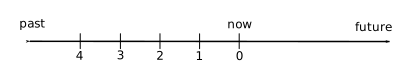
Sampling Time Line
Each sample point is assumed to be separated from its predecessor by a
constant amount of real time, the delta. The most recent sample
point is always zero. The value of delta may vary from one
expression to the next, but is fixed for each expression; for more
information on the sampling interval, see Setting Evaluation
Frequency.
For pmie, a metrics expression is the name of a metric, optionally
qualified by a host, instance and sample time specification. Special
characters introduce the qualifiers: colon (:) for hosts, hash or
pound sign (#) for instances, and at (@) for sample times. The
following expression refers to the previous value (@1) of the
counter for the disk read operations associated with the disk instance
#disk1 on the host moomba.
disk.dev.read :moomba #disk1 @1
In fact, this expression defines a point in the three-dimensional (3D)
parameter space of {host} x {instance} x {sample time} as
shown in figure_title.
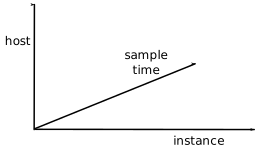
Three-Dimensional Parameter Space
A metric expression may also identify sets of values corresponding to one-, two-, or three-dimensional slices of this space, according to the following rules:
A metric expression consists of a PCP metric name, followed by optional host specifications, followed by optional instance specifications, and finally, optional sample time specifications.
A host specification consists of one or more host names, each prefixed by a colon (
:). For example::indy :far.away.domain.com :localhostA missing host specification implies the default
pmiesource of metrics, as defined by a-hoption on the command line, or the first named archive in an-aoption on the command line, or PMCD on the local host.An instance specification consists of one or more instance names, each prefixed by a hash or pound (
#) sign. For example:#eth0 #eth2Recall that you can discover the instance names for a particular metric, using the
pminfocommand. See use of PCP services.Within the
pmiegrammar, an instance name is an identifier. If the instance name contains characters other than alphanumeric characters, enclose the instance name in single quotes; for example,#'/boot' #'/usr'A missing instance specification implies all instances for the associated performance metric from each associated
pmiesource of metrics.A sample time specification consists of either a single time or a range of times. A single time is represented as an at (
@) followed by a natural number. A range of times is an at (@), followed by a natural number, followed by two periods (..) followed by a second natural number. The ordering of the end points in a range is immaterial. For example,@0..9specifies the last 10 sample times.A missing sample time specification implies the most recent sample time.
The following metric expression refers to a three-dimensional set of values, with two hosts in one dimension, five sample times in another, and the number of instances in the third dimension being determined by the number of configured disk spindles on the two hosts.
disk.dev.read :foo :bar @0..4
pmie Rate Conversion
pmie toolrate conversionrate conversionMany of the metrics delivered by PCP are cumulative counters. Consider the following metric:
disk.all.total
A single value for this metric tells you only that a certain number of disk I/O operations have occurred since boot time, and that information may be invalid if the counter has exceeded its 32-bit range and wrapped. You need at least two values, sampled at known times, to compute the recent rate at which the I/O operations are being executed. The required syntax would be this:
(disk.all.total @0 - disk.all.total @1) / delta
The accuracy of delta as a measure of actual inter-sample delay is
an issue. pmie requests samples, at intervals of approximately
delta, while the results exported from PMCD are time stamped with
the high-resolution system clock time when the samples were extracted.
For these reasons, a built-in and implicit rate conversion using
accurate time stamps is provided by pmie for performance metrics
that have counter semantics. For example, the following expression is
unconditionally converted to a rate by pmie.
disk.all.total
pmie Arithmetic Expressions
pmie toolarithmetic expressionsarithmetic expressionsWithin pmie,
simple arithmetic expressions are constructed from metrics expressions
(see Metric Expressions) and numeric constants,
using all of the arithmetic operators and precedence rules of the C
programming language.
All pmie arithmetic is performed in double precision.
Intrinsic Operators, describes additional operators that may be used for aggregate operations to reduce the dimensionality of an arithmetic expression.
pmie Logical Expressions
pmie toollogical expressionslogical expressionsA number of logical expression types are supported:
- Logical constants
- Relational expressions
- Boolean expressions
- Quantification operators
Logical Constants
logical constantsLike in the C programming language, pmie interprets
an arithmetic value of zero to be false, and all other arithmetic values
are considered true.
Relational Expressions
relational expressionsRelational expressions are the simplest form of
logical expression, in which values may be derived from arithmetic
expressions using pmie relational operators. For example, the
following is a relational expression that is true or false, depending on
the aggregate total of disk read operations per second being greater
than 50.
disk.all.read > 50 count/sec
All of the relational logical operators and precedence rules of the C
programming language are supported in pmie.
As described in Metric Expressions, arithmetic
expressions in pmie may assume set values. The relational operators
are also required to take constant, singleton, and set-valued
expressions as arguments. The result has the same dimensionality as the
operands. Suppose the rule in example_title is
given:
hosts = ":gonzo";
intfs = "#eth0 #eth2";
all_intf = network.interface.in.packets
               $hosts $intfs @0..2 > 300 count/sec;
Then the execution of pmie may proceed as follows:
pmie -V uag.11
all_intf:
       gonzo: [eth0]      ?      ?      ?
       gonzo: [eth2]      ?      ?      ?
all_intf:
       gonzo: [eth0]  false      ?      ?
       gonzo: [eth2]  false      ?      ?
all_intf:
       gonzo: [eth0]   true  false      ?
       gonzo: [eth2]  false  false      ?
all_intf:
       gonzo: [eth0]   true   true  false
       gonzo: [eth2]  false  false  false
At each sample, the relational operator greater than (>) produces six
truth values for the cross-product of the instance and
sample time dimensions.
Quantification Operators, describes additional logical operators that may be used to reduce the dimensionality of a relational expression.
Boolean Expressions
Boolean expressionsThe regular Boolean operators from the C programming
language are supported: conjunction (&&), disjunction (||) and
negation (!).
As with the relational operators, the Boolean operators accommodate set-valued operands, and set-valued results.
Quantification Operators
quantification operatorsoperatorsBoolean and relational operators may
accept set-valued operands and produce set-valued results. In many
cases, rules that are appropriate for performance management require a
set of truth values to be reduced along one or more of the dimensions of
hosts, instances, and sample times described in Metric
Expressions. The pmie quantification operators
perform this function.
Each quantification operator takes a one-, two-, or three-dimension set
of truth values as an operand, and reduces it to a set of smaller
dimension, by quantification along a single dimension. For example,
suppose the expression in the previous example is simplified and
prefixed by some_sample, to produce the following expression:
intfs = "#eth0 #eth2";
all_intf = some_sample network.interface.in.packets
                     $intfs @0..2 > 300 count/sec;
Then the expression result is reduced from six values to two (one per interface instance), such that the result for a particular instance will be false unless the relational expression for the same interface instance is true for at least one of the preceding three sample times.
There are existential, universal, and percentile quantification operators in each of the host, instance, and sample time dimensions to produce the nine operators as follows:
some_host- True if the expression is true for at least one host for the same
instance and
sample time. all_host- True if the expression is true for every host for the same instance and sample time.
- N
%_host - True if the expression is true for at least N% of the hosts for the same instance and sample time.
some_inst- True if the expression is true for at least one instance for the same host and sample time.
all_instance- True if the expression is true for every instance for the same host and sample time.
- N
%_instance - True if the expression is true for at least N% of the instances for the same host and sample time.
some_sample time- True if the expression is true for at least one sample time for the same host and instance.
all_sample time- True if the expression is true for every sample time for the same host and instance.
- N
%_sample time - True if the expression is true for at least N% of the sample times for the same host and instance.
These operators may be nested. For example, the following expression answers the question: “Are all hosts experiencing at least 20% of their disks busy either reading or writing?”
Servers = ":moomba :babylon";
all_host (
    20%_inst disk.dev.read $Servers > 40 ||
    20%_inst disk.dev.write $Servers > 40
);
The following expression uses different syntax to encode the same semantics:
all_host (
    20%_inst (
        disk.dev.read $Servers > 40 ||
        disk.dev.write $Servers > 40
    )
);
Note
To avoid confusion over precedence and scope for the quantification operators, use explicit parentheses.
Two additional quantification operators are available for the instance
dimension only, namely match_inst and nomatch_inst, that take a
regular expression and a boolean expression. The result is the boolean
AND of the expression and the result of matching (or not matching) the
associated instance name against the regular expression.
For example, this rule evaluates error rates on various 10BaseT Ethernet network interfaces (such as ecN, ethN, or efN):
some_inst
        match_inst "^(ec|eth|ef)"
                network.interface.total.errors > 10 count/sec
-> syslog "Ethernet errors:" " %i"
pmie Rule Expressions
rule expressionsRule expressions for pmie have the following syntax:
lexpr -> actions ;
The semantics are as follows:
If the logical expression
lexprevaluatestrue, then perform the actions that follow. Otherwise, do not perform the actions.It is required that
lexprhas a singular truth value. Aggregation and quantification operators must have been applied to reduce multiple truth values to a single value.When executed, an action completes with a success/failure status.
One or more actions may appear; consecutive actions are separated by operators that control the execution of subsequent actions, as follows:
- action-1
& Always execute subsequent actions (serial execution).
- action-1
| If action-1 fails, execute subsequent actions, otherwise skip the subsequent actions (alternation).
- action-1
An action is composed of a keyword to identify the action method, an optional time specification, and one or more arguments.
A time specification uses the same syntax as a valid time interval that
may be assigned to delta, as described in Setting Evaluation
Frequency. If the action is executed and the time
specification is present, pmie will suppress any subsequent
execution of this action until the wall clock time has advanced by time.
The arguments are passed directly to the action method.
The following action methods are provided:
shell- The single argument is passed to the shell for execution. This action
is implemented using
systemin the background. The action does not wait for the system call to return, and succeeds unless the fork fails. alarm- DISPLAY variableA notifier containing a time stamp, a single argument
as a message, and a Cancel button is posted on the current display
screen (as identified by the
DISPLAYenvironment variable). Each alarm action first checks if its notifier is already active. If there is an identical active notifier, a duplicate notifier is not posted. The action succeeds unless the fork fails. syslog- pmlogger toolsyslog functionA message is written into the system log.
If the first word of the first argument is
-p, the second word is interpreted as the priority (see thesyslog(3)man page); the message tag ispcp-pmie. The remaining argument is the message to be written to the system log. This action always succeeds. print- time-stamped messageA message containing a time stamp in
ctime(3)format and the argument is displayed out to standard output (stdout). This action always succeeds.
Within the argument passed to an action method, the following expansions are supported to allow some of the context from the logical expression on the left to appear to be embedded in the argument:
%h- The value of a host that makes the expression true.
%i- The value of an instance that makes the expression true.
%v- The value of a performance metric from the logical expression.
pmie tool%-tokenSome ambiguity may occur in respect to which host,
instance, or performance metric is bound to a %-token. In most cases,
the leftmost binding in the top-level subexpression is used. You may
need to use pmie in the interactive debugging mode (specify the
-d command line option) in conjunction with the -W command line
option to discover which subexpressions contributes to the %-token
bindings.
example_title illustrates some of the options when constructing rule expressions:
some_inst ( disk.dev.total > 60 )
       -> syslog 10 mins "[%i] busy, %v IOPS " &
          shell 1 hour "echo \
               'Disk %i is REALLY busy. Running at %v I/Os per second' \
               | Mail -s 'pmie alarm' sysadm";
system log fileIn this case, %v and %i are both associated with
the instances for the metric disk.dev.total that make the expression
true. If more than one instance makes the expression true (more than one
disk is busy), then the argument is formed by concatenating the result
from each %-token binding. The text added to the system log file might
be as shown in example_title:
Aug 6 08:12:44 5B:gonzo pcp-pmie[3371]:
                         [disk1] busy, 3.7 IOPS [disk2] busy, 0.3 IOPS
Note
When
pmieis processing performance metrics from a set of PCP archive logs, the actions will be processed in the expected manner; however, the action methods are modified to report a textual facsimile of the action on the standard output.
Consider the rule in example_title:
delta = 2 sec;  // more often for demonstration purposes
percpu  = "kernel.percpu";
// Unusual usr-sys split when some CPU is more than 20% in usr mode
// and sys mode is at least 1.5 times usr mode
//
cpu_usr_sys = some_inst (
        $percpu.cpu.sys > $percpu.cpu.user * 1.5 &&
        $percpu.cpu.user > 0.2
   ) ->  alarm "Unusual sys time: " "%i ";
When evaluated against an archive, the following output is generated (the alarm action produces a message on standard output):
pmafm ${HOME}/f4 pmie cpu.head cpu.00
alarm Wed Aug  7 14:54:48 2012: Unusual sys time: cpu0
alarm Wed Aug  7 14:54:50 2012: Unusual sys time: cpu0
alarm Wed Aug  7 14:54:52 2012: Unusual sys time: cpu0
alarm Wed Aug  7 14:55:02 2012: Unusual sys time: cpu0
alarm Wed Aug  7 14:55:06 2012: Unusual sys time: cpu0
pmie Intrinsic Operators
pmie toolintrinsic operatorsintrinsic operatorsThe following sections
describe some other useful intrinsic operators for pmie. These
operators are divided into three groups:
- Arithmetic aggregation
- The
rateoperator - Transitional operators
Arithmetic Aggregation
pmie toolarithmetic aggregationarithmetic aggregationFor set-valued arithmetic expressions, the following operators reduce the dimensionality of the result by arithmetic aggregation along one of the host, instance, or sample time dimensions. For example, to aggregate in the host dimension, the following operators are provided:
avg_host- avg_host operatorComputes the average value across all instances for the same host and sample time
sum_host- sum_host operatorComputes the total value across all instances for the same host and sample time
count_host- count_host operatorComputes the number of values across all instances for the same host and sample time
min_host- min_host operatorComputes the minimum value across all instances for the same host and sample time
max_host- max_host operatorComputes the maximum value across all instances for the same host and sample time
*_inst operator*_sample operatorTen additional operators correspond to
the forms *_inst and *_sample.
The following example illustrates the use of an aggregate operator in combination with an existential operator to answer the question “Does some host currently have two or more busy processors?”
// note '' to escape - in host name
poke = ":moomba :'mac-larry' :bitbucket";
some_host (
    count_inst ( kernel.percpu.cpu.user $poke +
                 kernel.percpu.cpu.sys $poke > 0.7 ) >= 2
    )
       -> alarm "2 or more busy CPUs";
The rate Operator
pmie toolrate operatorrate operatorThe rate operator computes the
rate of change of an arithmetic expression as shown in the following
example:
rate mem.util.cached
It returns the rate of change for the mem.util.cached performance
metric; that is, the rate at which page cache memory is being allocated
and released.
The rate intrinsic operator is most useful for metrics with
instantaneous value semantics. For metrics with counter semantics,
pmie already performs an implicit rate calculation (see the Rate
Conversion) and the rate operator would produce
the second derivative with respect to time, which is less likely to be
useful.
Transitional Operators
pmie tooltransitional operatorstransitional operatorsIn some cases, an action needs to be triggered when an expression changes from true to false or vice versa. The following operators take a logical expression as an operand, and return a logical expression:
rising- Has the value
truewhen the operand transitions fromfalsetotruein consecutive samples. falling- Has the value
falsewhen the operand transitions fromtruetofalsein consecutive samples.
pmie Examples
pmie toolreal examplesThe examples presented in this section are
task-oriented and use the full power of the pmie specification
language as described in Specification Language
for.
${PCP_DEMOS_DIR}Source code for the pmie examples in this chapter,
and many more examples, is provided within the PCP Tutorials and Case
Studies. example_title and
example_title illustrate monitoring CPU utilization
and disk activity.
// Some Common Performance Monitoring Scenarios
//
// The CPU Group
//
delta = 2 sec;  // more often for demonstration purposes
// common prefixes
//
percpu  = "kernel.percpu";
all     = "kernel.all";
// Unusual usr-sys split when some CPU is more than 20% in usr mode
// and sys mode is at least 1.5 times usr mode
//
cpu_usr_sys =
       some_inst (
           $percpu.cpu.sys > $percpu.cpu.user * 1.5 &&
           $percpu.cpu.user > 0.2
       )
           ->  alarm "Unusual sys time: " "%i ";
// Over all CPUs, syscall_rate > 1000 * no_of_cpus
//
cpu_syscall =
       $all.syscall > 1000 count/sec * hinv.ncpu
       ->  print "high aggregate syscalls: %v";
// Sustained high syscall rate on a single CPU
//
delta = 30 sec;
percpu_syscall =
       some_inst (
           $percpu.syscall > 2000 count/sec
       )
           -> syslog "Sustained syscalls per second? " "[%i] %v ";
// the 1 minute load average exceeds 5 * number of CPUs on any host
hosts = ":gonzo :moomba";   // change as required
delta = 1 minute;           // no need to evaluate more often than this
high_load =
     some_host (
           $all.load $hosts #'1 minute' > 5 * hinv.ncpu
       )
           -> alarm "High Load Average? " "%h: %v ";
// Some Common Performance Monitoring Scenarios
//
// The Disk Group
//
delta = 15 sec;         // often enough for disks?
// common prefixes
//
disk    = "disk";
// Any disk performing more than 40 I/Os per second, sustained over
// at least 30 seconds is probably busy
//
delta = 30 seconds;
disk_busy =
       some_inst (
           $disk.dev.total > 40 count/sec
       )
]      -> shell "Mail -s 'Heavy systained disk traffic' sysadm";
// Try and catch bursts of activity ... more than 60 I/Os per second
// for at least 25% of 8 consecutive 3 second samples
//
delta = 3 sec;
disk_burst =
       some_inst (
           25%_sample (
               $disk.dev.total @0..7 > 60 count/sec
           )
       )
       -> alarm "Disk Burst? " "%i ";
// any SCSI disk controller performing more than 3 Mbytes per
// second is busy
// Note: the obscure 512 is to convert blocks/sec to byte/sec,
//       and pmie handles the rest of the scale conversion
//
some_inst $disk.ctl.blktotal * 512 > 3 Mbyte/sec
           -> alarm "Busy Disk Controller: " "%i ";
Developing and Debugging pmie Rules
pmie tooldeveloping rulesGiven the -d command line option, pmie
executes in interactive mode, and the user is presented with a menu of
options:
pmie debugger commands
     f [file-name]      - load expressions from given file or stdin
     l [expr-name]      - list named expression or all expressions
     r [interval]       - run for given or default interval
     S time-spec        - set start time for run
     T time-spec        - set default interval for run command
     v [expr-name]      - print subexpression for %h, %i and %v bindings
     h or ?             - print this menu of commands
     q                  - quit
pmie>
If both the -d option and a filename are present, the expressions in
the given file are loaded before entering interactive mode. Interactive
mode is useful for debugging new rules.
Caveats and Notes on pmie
caveatsThe following sections provide important information for users of
pmie.
Performance Metrics Wraparound
Performance metrics that are cumulative counters may
occasionally overflow their range and wraparound to 0. When this
happens, an unknown value (printed as ?) is returned as the value of
the metric for one sample (recall that the value returned is normally a
rate). You can have PCP interpolate a value based on expected rate of
change by setting the PCP_COUNTER_WRAP environment variable.
pmie Sample Intervals
The sample interval (delta)
should always be long enough, particularly in the case of rates, to
ensure that a meaningful value is computed. Interval may vary according
to the metric and your needs. A reasonable minimum is in the range of
ten seconds or several minutes. Although PCP supports sampling rates up
to hundreds of times per second, using small sample intervals creates
unnecessary load on the monitored system.
pmie Instance Names
When you specify a metric instance name
(#identifier) in a pmie expression, it is compared against the
instance name looked up from either a live collector system or an
archive as follows:
- If the given instance name and the looked up name are the same, they are considered to match.
- Otherwise, the first two space separated tokens are extracted from the looked up name. If the given instance name is the same as either of these tokens, they are considered a match.
For some metrics, notably the per process (proc.xxx.xxx) metrics,
the first token in the looked up instance name is impossible to
determine at the time you are writing pmie expressions. The above
policy circumvents this problem.
pmie Error Detection
The parser used in pmie is
not particularly robust in handling syntax errors. It is suggested that
you check any problematic expressions individually in interactive mode:
pmie -v -d
pmie> f
expression
Ctrl+D
If the expression was parsed, its internal representation is shown:
pmie> l
The expression is evaluated twice and its value printed:
pmie> r 10sec
Then quit:
pmie> q
It is not always possible to detect semantic errors at parse time. This
happens when a performance metric descriptor is not available from the
named host at this time. A warning is issued, and the expression is put
on a wait list. The wait list is checked periodically (about every five
minutes) to see if the metric descriptor has become available. If an
error is detected at this time, a message is printed to the standard
error stream (stderr) and the offending expression is set aside.
Creating pmie Rules with pmieconf
The pmieconf tool is a
command line utility that is designed to aid the specification of
pmie rules from parameterized versions of the rules. pmieconf is
used to display and modify variables or parameters controlling the
details of the generated pmie rules.
pmieconf reads two different forms of supplied input files and
produces a localized pmie configuration file as its output.
The first input form is a generalized pmie rule file such as those
found below ${PCP_VAR_DIR}/config/pmieconf. These files contain the
generalized rules which pmieconf is able to manipulate. Each of the
rules can be enabled or disabled, or the individual variables associated
with each rule can be edited.
The second form is an actual pmie configuration file (that is, a
file which can be interpreted by pmie, conforming to the pmie
syntax described in Specification Language for).
This file is both input to and output from pmieconf.
The input version of the file contains any changed variables or rule
states from previous invocations of pmieconf, and the output version
contains both the changes in state (for any subsequent pmieconf
sessions) and the generated pmie syntax. The pmieconf state is
embedded within a pmie comment block at the head of the output file
and is not interpreted by pmie itself.
pmie toolprocedurespmieconf is an integral part of the pmie
daemon management process described in Management of
Processes. procedure_title and
procedure_title introduce the pmieconf tool
through a series of typical operations.
Start pmieconf interactively (as the
superuser).pmieconf -f ${PCP_SYSCONF_DIR}/pmie/config.demo Updates
will be made to ${PCP_SYSCONF_DIR}/pmie/config.demo pmieconf>
List the set of available pmieconf rules by using the rules
command.
List the set of rule groups using the groups command.
List only the enabled rules, using the rules enabled command.
List a single rule:
pmieconf> list memory.swap_low
   rule: memory.swap_low  [Low free swap space]
   help: There is only threshold percent swap space remaining - the system
         may soon run out of virtual memory.  Reduce the number and size of
         the running programs or add more swap(1) space before it
completely
         runs out.
         predicate =
           some_host (
               ( 100 * ( swap.free $hosts$ / swap.length $hosts$ ) )
                 < $threshold$
               && swap.length $hosts$ > 0        // ensure swap in use
            )
   vars: enabled = no
         threshold = 10%

pmieconf>
List one rule variable:pmieconf> list memory.swap_low threshold
rule: memory.swap_low [Low free swap space] threshold = 10% pmieconf>
Lower the threshold for the memory.swap_low rule, and also change
the pmie sample interval affecting just this rule. The delta
variable is special in that it is not associated with any particular
rule; it has been defined as a global pmieconf variable. Global
variables can be displayed using the list global command to
pmieconf, and can be modified either globally or local to a specific
rule. pmieconf> modify memory.swap_low threshold 5 pmieconf>
modify memory.swap_low delta "1 sec" pmieconf>
Disable all of the rules except for the memory.swap_low rule so that
you can see the effects of your change in isolation.
This produces a relatively simple pmie configuration file:pmieconf>
disable all pmieconf> enable memory.swap_low pmieconf>
status verbose: off enabled rules: 1 of 35 pmie configuration file:
${PCP_SYSCONF_DIR}/pmie/config.demo pmie processes (PIDs) using this
file: (none found) pmieconf> quit
You can also use the status command to verify that only one rule is
enabled at the end of this step.
Run pmie with the new configuration file. Use a text editor to view
the newly generated pmie configuration file
(${PCP_SYSCONF_DIR}/pmie/config.demo), and then run the
command:pmie -T "1.5 sec" -v -l ${HOME}/demo.log ${PCP_SYSCONF_DIR}/pmie/config.demo
memory.swap_low: false memory.swap_low: false cat ${HOME}/demo.log
Log for pmie on venus started Mon Jun 21 16:26:06 2012 pmie: PID =
21847, default host = venus [Mon Jun 21 16:26:07] pmie(21847) Info:
evaluator exiting Log finished Mon Jun 21 16:26:07 2012
Notice that both of the pmieconf files used in the previous step are
simple text files, as described in the pmieconf(5) man page:
file ${PCP_SYSCONF_DIR}/pmie/config.demo
${PCP_SYSCONF_DIR}/pmie/config.demo:  PCP pmie config (V.1)
file ${PCP_VAR_DIR}/config/pmieconf/memory/swap_low
${PCP_VAR_DIR}/config/pmieconf/memory/swap_low:       PCP pmieconf rules (V.1)
Management of pmie Processes
pmie toolproceduresThe pmie process can be run as a daemon as part
of the system startup sequence, and can thus be used to perform
automated, live performance monitoring of a running system. To do this,
run these commands (as superuser):
chkconfig pmie on
${PCP_RC_DIR}/pmie start
By default, these enable a single pmie process monitoring the local
host, with the default set of pmieconf rules enabled (for more
information about pmieconf, see Creating Rules
with). procedure_title
illustrates how you can use these commands to start any number of
pmie processes to monitor local or remote machines.
Use a text editor (as superuser) to edit the pmie
${PCP_PMIECONTROL_PATH} and ${PCP_PMIECONTROL_PATH}.d control
files. Notice the default entry, which looks like this:
#Host           P?  S?  Log File                                  Arguments
LOCALHOSTNAME   y   n   PCP_LOG_DIR/pmie/LOCALHOSTNAME/pmie.log   -c config.default
This entry is used to enable a local pmie process. Add a new entry
for a remote host on your local network (for example, venus), by
using your pmie configuration file (see Creating Rules
with):
#Host           P?  S?  Log File                                  Arguments
venus           n   n   PCP_LOG_DIR/pmie/venus/pmie.log           -c config.demo
Note
Without an absolute path, the configuration file (
-cabove) will be resolved using${PCP_SYSCONF_DIR}/pmie- ifconfig.demowas created in procedure_title it would be used here for hostvenus, otherwise a new configuration file will be generated using the default rules (at${PCP_SYSCONF_DIR}/pmie/config.demo).
Enable pmie daemon management: chkconfig pmie on
This simple step allows pmie to be started as part of your machine’s
boot process.
Start the two pmie daemons. At the end of this step, you should see
two new pmie processes monitoring the local and remote hosts:
${PCP_RC_DIR}/pmie start
Performance Co-Pilot starting inference engine(s) ...
Wait a few moments while the startup scripts run. The pmie start
script uses the pmie_check script to do most of its work.
Verify that the pmie processes have started:
pcp
Performance Co-Pilot configuration on pluto:

 platform: Linux pluto 3.10.0-0.rc7.64.el7.x86_64 #1 SMP
 hardware: 8 cpus, 2 disks, 23960MB RAM
 timezone: EST-10
     pmcd: Version 3.11.3-1, 8 agents
     pmda: pmcd proc xfs linux mmv infiniband gluster elasticsearch
     pmie: pluto: ${PCP_LOG_DIR}/pmie/pluto/pmie.log
           venus: ${PCP_LOG_DIR}/pmie/venus/pmie.log
If a remote host is not up at the time when pmie is started, the
pmie process may exit. pmie processes may also exit if the local
machine is starved of memory resources. To counter these adverse cases,
it can be useful to have a crontab entry running. Adding an entry as
shown in Add a Entry ensures that if one of the
configured pmie processes exits, it is automatically restarted.
Note
Depending on your platform, the
crontabentry discussed here may already have been installed for you, as part of the package installation process. In this case, the file/etc/cron.d/pcp-pmiewill exist, and the rest of this section can be skipped.
Add a pmie crontab Entry
To activate the maintenance and housekeeping scripts for a collection of
inference engines, execute the following tasks while logged into the
local host as the superuser (root):
Augment the
crontabfile for thepcpuser. For example:crontab -l -u pcp > ${HOME}/crontab.txtEdit
${HOME}/crontab.txt, adding lines similar to those from the sample${PCP_VAR_DIR}/config/pmie/crontabfile forpmie_dailyandpmie_check; for example:# daily processing of pmie logs 10 0 * * * ${PCP_BINADM_DIR}/pmie_daily # every 30 minutes, check pmie instances are running 25,55 * * * * ${PCP_BINADM_DIR}/pmie_checkMake these changes permanent with this command:
crontab -u pcp < ${HOME}/crontab.txt
Global Files and Directories
pmie toolglobal files and directoriesThe following global files and
directories influence the behavior of pmie and the pmie
management scripts:
${PCP_DEMOS_DIR}/pmie/*- Contains sample
pmierules that may be used as a basis for developing local rules. ${PCP_SYSCONF_DIR}/pmie/config.default- Is the default
pmieconfiguration file that is used when thepmiedaemon facility is enabled. Generated bypmieconfif not manually setup beforehand. ${PCP_VAR_DIR}/config/pmieconf/*/*- Contains the
pmieconfrule definitions (templates) in its subdirectories. ${PCP_PMIECONTROL_PATH}and${PCP_PMIECONTROL_PATH}.dfiles- Defines which PCP collector hosts require a daemon
pmieto be launched on the local host, where the configuration file comes from, where thepmielog file should be created, andpmiestartup options. ${PCP_VAR_DIR}/config/pmlogger/crontab- Contains default
crontabentries that may be merged with thecrontabentries for root to schedule the periodic execution of thepmie_checkscript, for verifying thatpmieinstances are running. Only for platforms where a defaultcrontabis not automatically installed during the initial PCP package installation. ${PCP_LOG_DIR}/pmie/*- Contains the
pmielog files for the host. These files are created by the default behavior of the${PCP_RC_DIR}/pmiestartup scripts.
pmie Instances and Their Progress
The PMCD PMDA exports information about executing pmie instances and
their progress in terms of rule evaluations and action execution rates.
pmie_check- This command is similar to the
pmloggersupport script,pmlogger_check. ${PCP_RC_DIR}/pmie- This start script supports the starting and stopping of multiple
pmieinstances that are monitoring one or more hosts. ${PCP_TMP_DIR}/pmie- The statistics that
pmiegathers are maintained in binary data structure files. These files are located in this directory. pmcd.pmiemetrics- If
pmieis running on a system with a PCP collector deployment, the PMCD PMDA exports these metrics via thepmcd.pmiegroup of metrics.
Archive Logging
Performance monitoring and management in complex systems demands the ability to accurately capture performance characteristics for subsequent review, analysis, and comparison. Performance Co-Pilot (PCP) provides extensive support for the creation and management of archive logs that capture a user-specified profile of performance information to support retrospective performance analysis.
The following major sections are included in this chapter:
- Introduction to Archive Logging, presents the concepts and issues involved with creating and using archive logs.
- Using Archive Logs with Performance Tools, describes the interaction of the PCP tools with archive logs.
- Cookbook for Archive Logging, shows some shortcuts for setting up useful PCP archive logs.
- Other Archive Logging Features and Services, provides information about other archive logging features and sevices.
- Archive Logging Troubleshooting, presents helpful directions if your archive logging implementation is not functioning correctly.
Introduction to Archive Logging
pmlogger toolarchive logsWithin the PCP, the pmlogger utility may be
configured to collect archives of performance metrics. The archive
creation process is simple and very flexible, incorporating the
following features:
- Archive log creation at either a PCP collector (typically a server) or a PCP monitor system (typically a workstation), or at some designated PCP archive logger host.
- Concurrent independent logging, both local and remote. The
performance analyst can activate a private
pmloggerinstance to collect only the metrics of interest for the problem at hand, independent of other logging on the workstation or remote host. - Independent determination of logging frequency for individual metrics or metric instances. For example, you could log the “5 minute” load average every half hour, the write I/O rate on the DBMS log spindle every 10 seconds, and aggregate I/O rates on the other disks every minute.
- pmlc tooldynamic adjustmentpmlogger tool pmlc controlDynamic
adjustment of what is to be logged, and how frequently, via
pmlc. This feature may be used to disable logging or to increase the sample interval during periods of low activity or chronic high activity. A localpmlcmay interrogate and control a remotepmlogger, subject to the access control restrictions implemented bypmlogger. - Self-contained logs that include all system configuration and metadata required to interpret the values in the log. These logs can be kept for analysis at a much later time, potentially after the hardware or software has been reconfigured and the logs have been stored as discrete, autonomous files for remote analysis. The logs are endian-neutral and platform independent - there is no requirement that the monitor host machine used for analysis be similar to the collector machine in any way, nor do they have to have the same versions of PCP. PCP archives created over 15 years ago can still be replayed with the current versions of PCP!
- cron scripts
cron-based scripts to expedite the operational management, for example, log rotation, consolidation, and culling. Another helper tool,pmlogconfcan be used to generate suitable logging configurations for a variety of situations. - mkaf toolpmafm toolarchive foliosArchive folios as a convenient
aggregation of multiple archive logs. Archive folios may be created
with the
mkafutility and processed with thepmafmtool.
Archive Logs and the PMAPI
archive logsPMAPICritical to the success of the PCP archive logging scheme is the fact that the library routines providing access to real-time feeds of performance metrics also provide access to the archive logs.
PMAPIarchive logsLive feeds (or real-time) sources of performance metrics and archives are literally interchangeable, with a single Performance Metrics Application Programming Interface (PMAPI) that preserves the same semantics for both styles of metric source. In this way, applications and tools developed against the PMAPI can automatically process either live or historical performance data.
Retrospective Analysis Using Archive Logs
archive logsretrospective analysisretrospective analysisOne of the most important applications of archive logging services provided by PCP is in the area of retrospective analysis. In many cases, understanding today’s performance problems can be assisted by side-by-side comparisons with yesterday’s performance. With routine creation of performance archive logs, you can concurrently replay pictures of system performance for two or more periods in the past.
Archive logs are also an invaluable source of intelligence when trying to diagnose what went wrong, as in a performance post-mortem. Because the PCP archive logs are entirely self-contained, this analysis can be performed off-site if necessary.
Each archive log contains metric values from only one host. However, many PCP tools can simultaneously visualize values from multiple archives collected from different hosts.
The archives can be replayed using the inference engine (pmie is an
application that uses the PMAPI). This allows you to automate the
regular, first-level analysis of system performance.
Such analysis can be performed by constructing suitable expressions to
capture the essence of common resource saturation problems, then
periodically creating an archive and playing it against the expressions.
For example, you may wish to create a daily performance audit (perhaps
run by the cron command) to detect performance regressions.
For more about pmie, see Performance Metrics Inference
Engine.
Using Archive Logs for Capacity Planning
archive logscapacity planningcapacity planningBy collecting performance archives with relatively long sampling periods, or by reducing the daily archives to produce summary logs, the capacity planner can collect the base data required for forward projections, and can estimate resource demands and explore “what if” scenarios by replaying data using visualization tools and the inference engine.
Using Archive Logs with Performance Tools
performance visualization toolsMost PCP tools default to real-time display of current values for performance metrics from PCP collector host(s). However, most PCP tools also have the capability to display values for performance metrics retrieved from PCP archive log(s). The following sections describe plans, steps, and general issues involving archive logs and the PCP tools.
Coordination between pmlogger and PCP tools
pmlogger toolPCP tool coordinationMost commonly, a PCP tool would be
invoked with the -a option to process sets of archive logs some time
after pmlogger had finished creating the archive. However, a tool
such as pmchart that uses a Time Control dialog (see Time Duration
and Control) stops when the end of a set of
archives is reached, but could resume if more data is written to the PCP
archive log.
Note
SIGUSR1 signalflush commandpmlc toolflush command
pmloggeruses buffered I/O to write the archive log so that the end of the archive may be aligned with an I/O buffer boundary, rather than with a logical archive log record. If such an archive was read by a PCP tool, it would appear truncated and might confuse the tool. These problems may be avoided by sendingpmloggeraSIGUSR1signal, or by using theflushcommand ofpmlcto forcepmloggerto flush its output buffers.
Administering PCP Archive Logs Using cron Scripts
cron scriptsscriptsMany operating systems support the cron process
scheduling system.
pmlogger_check scriptpmlogger_daily scriptpmsnap toolscript
usagepmlogger_merge scriptPCP supplies shell scripts to use the cron
functionality to help manage your archive logs. The following scripts
are supplied:
- Script
- Description
pmlogger_daily(1)- Performs a daily housecleaning of archive logs and notices.
pmlogger_merge(1)- ``
\ Merges archive logs and is called by ``pmlogger_daily. pmlogger_check(1)- Checks to see that all desired
pmloggerprocesses are running on your system, and invokes any that are missing for any reason. pmlogconf(1)- Generates suitable
pmloggerconfiguration files based on a pre-defined set of templates. It can probe the state of the system under observation to make informed decisions about which metrics to record. This is an extensible facility, allowing software upgrades and new PMDA installations to add to the existing set of templates. pmsnap(1)- Generates graphic image snapshots of
pmchartperformance charts at regular intervals.
${PCP_PMLOGGERCONTROL_PATH} fileThe configuration files used by these
scripts can be edited to suit your particular needs, and are generally
controlled by the ${PCP_PMLOGGERCONTROL_PATH} and
${PCP_PMLOGGERCONTROL_PATH}.d files (pmsnap has an additional
control file, ${PCP_PMSNAPCONTROL_PATH}). Complete information on
these scripts is available in the pmlogger_daily(1) and
pmsnap(1) man pages.
Archive Log File Management
archive logsfile managementPCP archive log files can occupy a great deal of disk space, and management of archive logs can be a large task in itself. The following sections provide information to assist you in PCP archive log file management.
Basename Conventions
basename conventionsWhen a PCP archive is created by pmlogger, an
archive basename must be specified and several physical files are
created, as shown in Filenames for PCP Archive Log Components.
| Filename | Contents |
|---|---|
archive.i
ndex |
Temporal index for rapid access to archive contents. |
archive.m
eta |
Metadata descriptions for performance metrics and instance domains appearing in the archive. |
archive.N |
Volumes of performance metrics values, for N =
0,1,2,… |
Log Volumes
log volumesA single PCP archive may be partitioned into a number of volumes. These volumes may expedite management of the archive; however, the metadata file and at least one volume must be present before a PCP tool can process the archive.
You can control the size of an archive log volume by using the -v
command line option to pmlogger. This option specifies how large a
volume should become before pmlogger starts a new volume. Archive
log volumes retain the same base filename as other files in the archive
log, and are differentiated by a numeric suffix that is incremented with
each volume change. For example, you might have a log volume sequence
that looks like this:
netserver-log.0
netserver-log.1
netserver-log.2
SIGHUP signalpmlc toolSIGHUP signalYou can also cause an existing log to
be closed and a new one to be opened by sending a SIGHUP signal to
pmlogger, or by using the pmlc command to change the
pmlogger instructions dynamically, without interrupting pmlogger
operation. Complete information on log volumes is found in the
pmlogger(1) man page.
Basenames for Managed Archive Log Files
The PCP archive management tools support a consistent scheme for selecting the basenames for the files in a collection of archives and for mapping these files to a suitable directory hierarchy.
Once configured, the PCP tools that manage archive logs employ a
consistent scheme for selecting the basename for an archive each time
pmlogger is launched, namely the current date and time in the format
YYYYMMDD.HH.MM. Typically, at the end of each day, all archives for a
particular host on that day would be merged to produce a single archive
with a basename constructed from the date, namely YYYYMMDD. The
pmlogger_daily script performs this action and a number of other
routine housekeeping chores.
Directory Organization for Archive Log Files
If you are using a deployment of PCP tools and daemons to collect metrics from a variety of hosts and storing them all at a central location, you should develop an organized strategy for storing and naming your log files.
Note
pmchart toolshort-term executionsThere are many possible configurations of
pmlogger, as described in PCP Archive Logger Deployment. The directory organization described in this section is recommended for any system on whichpmloggeris configured for permanent execution (as opposed to short-term executions, for example, as launched frompmchartto record some performance data of current interest).
Typically, the filesystem structure can be used to reflect the number of
hosts for which a pmlogger instance is expected to be running
locally, obviating the need for lengthy and cumbersome filenames. It
makes considerable sense to place all logs for a particular host in a
separate directory named after that host. Because each instance of
pmlogger can only log metrics fetched from a single host, this also
simplifies some of the archive log management and administration tasks.
For example, consider the filesystem and naming structure shown in figure_title.
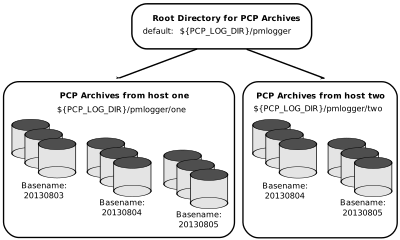
Archive Log Directory Structure
${PCP_PMLOGGERCONTROL_PATH} fileThe specification of where to place the
archive log files for particular pmlogger instances is encoded in
the ${PCP_PMLOGGERCONTROL_PATH} and
${PCP_PMLOGGERCONTROL_PATH}.d configuration files, and these files
should be customized on each host running an instance of pmlogger.
If many archives are being created, and the associated PCP collector systems form peer classes based upon service type (Web servers, DBMS servers, NFS servers, and so on), then it may be appropriate to introduce another layer into the directory structure, or use symbolic links to group together hosts providing similar service types.
Configuration of pmlogger
pmlogger toolconfigurationThe configuration files used by pmlogger
describe which metrics are to be logged. Groups of metrics may be logged
at different intervals to other groups of metrics. Two states, mandatory
and advisory, also apply to each group of metrics, defining whether
metrics definitely should be logged or not logged, or whether a later
advisory definition may change that state.
The mandatory state takes precedence if it is on or off, causing
any subsequent request for a change in advisory state to have no effect.
If the mandatory state is maybe, then the advisory state determines
if logging is enabled or not.
The mandatory states are on, off, and maybe. The advisory
states, which only affect metrics that are mandatory maybe, are
on and off. Therefore, a metric that is mandatory maybe in
one definition and advisory on in another definition would be logged
at the advisory interval. Metrics that are not specified in the
pmlogger configuration file are mandatory maybe and advisory
off by default and are not logged.
A complete description of the pmlogger configuration format can be
found on the pmlogger(1) man page.
PCP Archive Contents
archive logscontentspmdumplog toolarchive log contentsOnce a PCP archive
log has been created, the pmdumplog utility may be used to display
various information about the contents of the archive. For example,
start with the following command:
pmdumplog -l ${PCP_LOG_DIR}/pmlogger/www.sgi.com/19960731
It might produce the following output:
Log Label (Log Format Version 1)
Performance metrics from host www.sgi.com
     commencing Wed Jul 31 00:16:34.941 1996
     ending     Thu Aug  1 00:18:01.468 1996
The simplest way to discover what performance metrics are contained
within a set of archives is to use pminfo as shown in
example_title:
pminfo -a ${PCP_LOG_DIR}/pmlogger/www.sgi.com/19960731 network.mbuf
network.mbuf.alloc
network.mbuf.typealloc
network.mbuf.clustalloc
network.mbuf.clustfree
network.mbuf.failed
network.mbuf.waited
network.mbuf.drained
Cookbook for Archive Logging
cookbookpmlogger toolcookbook tasksThe following sections present a
checklist of tasks that may be performed to enable PCP archive logging
with minimal effort. For a complete explanation, refer to the other
sections in this chapter and the man pages for pmlogger and related
tools.
Primary Logger
primary archiveAssume you wish to activate primary archive logging on
the PCP collector host pluto. Execute the following while logged
into pluto as the superuser (root).
Start
pmcdandpmlogger:chkconfig pmcd on chkconfig pmlogger on ${PCP_RC_DIR}/pmcd start Starting pmcd ... ${PCP_RC_DIR}/pmlogger start Starting pmlogger ...Verify that the primary
pmloggerinstance is running:pcp Performance Co-Pilot configuration on pluto: platform: Linux pluto 3.10.0-0.rc7.64.el7.x86_64 #1 SMP hardware: 8 cpus, 2 disks, 23960MB RAM timezone: EST-10 pmcd: Version 4.0.0-1, 8 agents pmda: pmcd proc xfs linux mmv infiniband gluster elasticsearch pmlogger: primary logger: pluto/20170815.10.00 pmie: pluto: ${PCP_LOG_DIR}/pmie/pluto/pmie.log venus: ${PCP_LOG_DIR}/pmie/venus/pmie.logVerify that the archive files are being created in the expected place:
ls ${PCP_LOG_DIR}/pmlogger/pluto
20170815.10.00.0
20170815.10.00.index
20170815.10.00.meta
Latest
pmlogger.log
Verify that no errors are being logged, and the rate of expected growth of the archives:
cat ${PCP_LOG_DIR}/pmlogger/pluto/pmlogger.log
Log for pmlogger on pluto started Thu Aug 15 10:00:11 2017

Config parsed
Starting primary logger for host "pluto"
Archive basename: 20170815.00.10

Group [26 metrics] {
    hinv.map.lvname
    ...
    hinv.ncpu
} logged once: 1912 bytes

Group [11 metrics] {
    kernel.all.cpu.user
    ...
    kernel.all.load
} logged every 60 sec: 372 bytes or 0.51 Mbytes/day

...
Other Logger Configurations
Assume you wish to create archive logs on the local host for performance
metrics collected from the remote host venus. Execute all of the
following tasks while logged into the local host as the superuser
(root).
Create a suitable pmlogger configuration file. There are several
options:
Run the
pmlogconf(1)utility to generate a configuration file, and (optionally) interactively customize it further to suit local needs.${PCP_BINADM_DIR}/pmlogconf ${PCP_SYSCONF_DIR}/pmlogger/config.venus Creating config file "${PCP_SYSCONF_DIR}/pmlogger/config.venus" using default settings ${PCP_BINADM_DIR}/pmlogconf ${PCP_SYSCONF_DIR}/pmlogger/config.venus Group: utilization per CPU Log this group? [n] y Logging interval? [default] Group: utilization (usr, sys, idle, ...) over all CPUs Log this group? [y] y Logging interval? [default] Group: per spindle disk activity Log this group? [n] y ...Do nothing - a default configuration will be created in the following step, using
pmlogconf(1)probing and automatic file generation based on the metrics available at the remote host. The${PCP_RC_DIR}/pmloggerstart script handles this.Manually - create a configuration file with a text editor, or arrange to have one put in place by configuration management tools like Puppet or Chef.
Edit ${PCP_PMLOGGERCONTROL_PATH}, or one of the
${PCP_PMLOGGERCONTROL_PATH}.d files. Using the line for remote
as a template, add the following line:
venus n n PCP_LOG_DIR/pmlogger/venus -r -T24h10m -c config.venus
Start pmlogger:
${PCP_BINADM_DIR}/pmlogger_check
Restarting pmlogger for host "venus" ..... done
Verify that the pmlogger instance is running:
pcp
Performance Co-Pilot configuration on pluto:

 platform: Linux pluto 3.10.0-0.rc7.64.el7.x86_64 #1 SMP
 hardware: 8 cpus, 2 disks, 23960MB RAM
 timezone: EST-10
     pmcd: Version 3.8.3-1, 8 agents
     pmda: pmcd proc linux xfs mmv infiniband gluster elasticsearch
     pmlogger: primary logger: pluto/20170815.10.00
           venus.redhat.com: venus/20170815.11.15
pmlc
pmlc> show loggers
The following pmloggers are running on pluto:
        primary (19144) 5141
pmlc> connect 5141
pmlc> status
pmlogger [5141] on host pluto is logging metrics from host venus
log started      Thu Aug 15 11:15:39 2017 (times in local time)
last log entry   Thu Aug 15 11:47:39 2017
current time     Thu Aug 15 11:48:13 2017
log volume       0
log size         146160
To create archive logs on the local host for performance metrics
collected from multiple remote hosts, repeat the steps in
procedure_title for each remote host (each with a new
control file entry).
Archive Log Administration
Assume the local host has been set up to create archive logs of performance metrics collected from one or more hosts (which may be either the local host or a remote host).
Note
Depending on your platform, the
crontabentry discussed here may already have been installed for you, as part of the package installation process. In this case, the file/etc/cron.d/pcp-pmloggerwill exist, and the rest of this section can be skipped.
To activate the maintenance and housekeeping scripts for a collection of
archive logs, execute the following tasks while logged into the local
host as the superuser (root):
Augment the
crontabfile for thepcpuser. For example:crontab -l -u pcp > ${HOME}/crontab.txtEdit
${HOME}/crontab.txt, adding lines similar to those from the sample${PCP_VAR_DIR}/config/pmlogger/crontabfile forpmlogger_dailyandpmlogger_check; for example:# daily processing of archive logs 10 0 * * * ${PCP_BINADM_DIR}/pmlogger_daily # every 30 minutes, check pmlogger instances are running 25,55 * * * * ${PCP_BINADM_DIR}/pmlogger_checkMake these changes permanent with this command:
crontab -u pcp < ${HOME}/crontab.txt
Other Archive Logging Features and Services
Other archive logging features and services include PCP archive folios,
manipulating archive logs, primary logger, and using pmlc.
PCP Archive Folios
A collection of one or more sets of PCP archive logs may be combined
with a control file to produce a PCP archive folio. Archive folios are
created using either mkaf or the interactive record mode services of
various PCP monitor tools (e.g. pmchart and pmrep).
The automated archive log management services also
create an archive folio named Latest for each managed pmlogger
instance, to provide a symbolic name to the most recent archive log.
With reference to figure_title, this would mean the
creation of the folios ${PCP_LOG_DIR}/pmlogger/one/Latest and
${PCP_LOG_DIR}/pmlogger/two/Latest.
pmafm toolinteractive commandsThe pmafm utility is completely
described in the pmafm(1) man page, and provides the interactive
commands (single commands may also be executed from the command line)
for the following services:
- Checking the integrity of the archives in the folio.
- Displaying information about the component archives.
- Executing PCP tools with their source of performance metrics assigned concurrently to all of the component archives (where the tool supports this), or serially executing the PCP tool once per component archive.
- If the folio was created by a single PCP monitoring tool, replaying all of the archives in the folio with that monitoring tool.
- Restricting the processing to particular archives, or the archives associated with particular hosts.
Manipulating Archive Logs with pmlogextract
pmlogextract tool The pmlogextract tool takes a number of PCP
archive logs from a single host and performs the following tasks:
- Merges the archives into a single log, while maintaining the correct time stamps for all values.
- Extracts all metric values within a temporal window that could encompass several archive logs.
- Extracts only a configurable subset of metrics from the archive logs.
See the pmlogextract(1) man page for full information on this
command.
Summarizing Archive Logs with pmlogsummary
pmlogsummary tool The pmlogsummary tool provides statistical
summaries of archives, or specific metrics within archives, or specific
time windows of interest in a set of archives. These summaries include
various averages, minima, maxima, sample counts, histogram bins, and so
on.
As an example, for Linux host pluto, report on its use of anonymous
huge pages - average use, maximum, time at which maximum occured, total
number of samples in the set of archives, and the units used for the
values - as shown in example_title:
pmlogsummary -MIly ${PCP_LOG_DIR}/pmlogger/pluto/20170815 mem.util.anonhugepages
Performance metrics from host pluto
  commencing Thu Aug 15 00:10:12.318 2017
  ending     Fri Aug 16 00:10:12.299 2017

mem.util.anonhugepages  7987742.326 8116224.000 15:02:12.300 1437 Kbyte

pminfo -t mem.util.anonhugepages
mem.util.anonhugepages [amount of memory in anonymous huge pages]
See the pmlogsummary(1) man page for detailed information about this
commands many options.
Primary Logger
primary loggerpmlogger toolprimary instanceOn each system for which PMCD
is active (each PCP collector system), there is an option to have a
distinguished instance of the archive logger pmlogger (the “primary”
logger) launched each time PMCD is started. This may be used to ensure
the creation of minimalist archive logs required for ongoing system
management and capacity planning in the event of failure of a system
where a remote pmlogger may be running, or because the preferred
archive logger deployment is to activate pmlogger on each PCP
collector system.
Run the following command as superuser on each PCP collector system
where you want to activate the primary pmlogger:
chkconfig pmlogger on
The primary logger launches the next time the
${PCP_RC_DIR}/pmlogger start script runs. If you wish this to happen
immediately, follow up with this command:
${PCP_BINADM_DIR}/pmlogger_check -V
${PCP_PMLOGGERCONTROL_PATH}
file${PCP_SYSCONF_DIR}/pmlogger/config.default fileWhen it is started in
this fashion, the ${PCP_PMLOGGERCONTROL_PATH} file (or one of the
${PCP_PMLOGGERCONTROL_PATH}.d files) must use the second field of
one configuration line to designate the primary logger, and usually will
also use the pmlogger configuration file
${PCP_SYSCONF_DIR}/pmlogger/config.default (although the latter is
not mandatory).
Using pmlc
pmlogger toolconfigurationpmlc tool descriptionYou may tailor
pmlogger dynamically with the pmlc command (if it is configured
to allow access to this functionality). Normally, the pmlogger
configuration is read at startup. If you choose to modify the config
file to change the parameters under which pmlogger operates, you
must stop and restart the program for your changes to have effect.
Alternatively, you may change parameters whenever required by using the
pmlc interface.
To run the pmlc tool, enter:
pmlc
By default, pmlc acts on the primary instance of pmlogger on the
current host. See the pmlc(1) man page for a description of command
line options. When it is invoked, pmlc presents you with a prompt:
pmlc>
You may obtain a listing of the available commands by entering a question mark (?) and pressing Enter. You see output similar to that in example_title:
show loggers [@<host>]           display <pid>s of running pmloggers
connect _logger_id [@<host>]     connect to designated pmlogger
status                           information about connected pmlogger
query metric-list                show logging state of metrics
new volume                       start a new log volume
flush                            flush the log buffers to disk
log { mandatory | advisory } on <interval> _metric-list
log { mandatory | advisory } off _metric-list
log mandatory maybe _metric-list
timezone local|logger|'<timezone>' change reporting timezone
help                               print this help message
quit                               exit from pmlc
_logger_id   is  primary | <pid> | port <n>
_metric-list is  _metric-spec | { _metric-spec ... }
_metric-spec is  <metric-name> | <metric-name> [ <instance> ... ]
Here is an example:
pmlc
pmlc> show loggers @babylon
The following pmloggers are running on babylon:
       primary (1892)
pmlc> connect 1892 @babylon
pmlc> log advisory on 2 secs disk.dev.read
pmlc> query disk.dev
disk.dev.read
       adv  on  nl       5 min  [131073 or “disk1”]
       adv  on  nl       5 min  [131074 or “disk2”]
pmlc> quit
Note
Any changes to the set of logged metrics made via
pmlcare not saved, and are lost the next timepmloggeris started with the same configuration file. Permanent changes are made by modifying thepmloggerconfiguration file(s).
Refer to the pmlc(1) and pmlogger(1) man pages for complete
details.
Archive Logging Troubleshooting
troubleshootingarchive loggingarchive logs troubleshootingpmlogger
tooltroubleshootingThe following issues concern the creation and use of
logs using pmlogger.
pmlogger Cannot Write Log
- Symptom:
The
pmloggerutility does not start, and you see this message:__pmLogNewFile: “foo.index” already exists, not over-written
- Cause:
Archive logs are considered sufficiently precious that
pmloggerdoes not empty or overwrite an existing set of archive log files. The log namedfooactually consists of the physical filefoo.index,foo.meta, and at least one filefoo.N, whereNis in the range 0, 1, 2, 3, and so on.A message similar to the one above is produced when a new
pmloggerinstance encounters one of these files already in existence.- Resolution:
Move the existing archive aside, or if you are sure, remove all of the parts of the archive log. For example, use the following command:
rm -f foo.*Then rerun
pmlogger.
Cannot Find Log
- Symptom:
pmdumplog tool troubleshootingThe
pmdumplogutility, or any tool that can read an archive log, displays this message:Cannot open archive mylog: No such file or directory
- Cause:
An archive consists of at least three physical files. If the base name for the archive is
mylog, then the archive actually consists of the physical filesmylog.index,mylog.meta, and at least one filemylog.N, whereNis in the range 0, 1, 2, 3, and so on.The above message is produced if one or more of the files is missing.
- Resolution:
Use this command to check which files the utility is trying to open:
ls mylog.*Turn on the internal debug flag
DBG_TRACE_LOG(-D128) to see which files are being inspected by thepmOpenLogroutine as shown in the following example:pmdumplog -D 128 -l mylogLocate the missing files and move them all to the same directory, or remove all of the files that are part of the archive, and recreate the archive log.
Primary pmlogger Cannot Start
- Symptom:
The primary
pmloggercannot be started. A message like the following appears:pmlogger: there is already a primary pmlogger running
- Cause:
- There is either a primary
pmloggeralready running, or the previous primarypmloggerwas terminated unexpectedly before it could perform its cleanup operations. - Resolution:
show commandpmlc toolshow commandSIGINT signalkill commandIf there is already a primary
pmloggerrunning and you wish to replace it with a newpmlogger, use theshowcommand inpmlcto determine the process ID of the primarypmlogger. The process ID of the primarypmloggerappears in parentheses after the word “primary.” Send aSIGINTsignal to the process to shut it down (use either thekillcommand if the platform supports it, or thepmsignalcommand). If the process does not exist, proceed to the manual cleanup described in the paragraph below. If the process did exist, it should now be possible to start the newpmlogger.If
pmlc’sshowcommand displays a process ID for a process that does not exist, apmloggerprocess was terminated before it could clean up. If it was the primarypmlogger, the corresponding control files must be removed before one can start a new primarypmlogger. It is a good idea to clean up any spurious control files even if they are not for the primarypmlogger.${PCP_TMP_DIR}/pmlogger filesThe control files are kept in
${PCP_TMP_DIR}/pmlogger. A control file with the process ID of thepmloggeras its name is created when thepmloggeris started. In addition, the primarypmloggercreates a symbolic link namedprimaryto its control file.For the primary
pmlogger, remove both the symbolic link and the file (corresponding to its process ID) to which the link points. For otherpmloggers, remove just the process ID file. Do not remove any other files in the directory. If the control file for an activepmloggeris removed,pmlcis not able to contact it.
Identifying an Active pmlogger Process
- Symptom:
- active pmlogger processYou have a PCP archive log that is
demonstrably growing, but do not know the identify of the associated
pmloggerprocess. - Cause:
- The PID is not obvious from the log, or the archive name may not be
obvious from the output of the
pscommand. - Resolution:
If the archive basename is
foo, run the following commands:pmdumplog -l foo Log Label (Log Format Version 1) Performance metrics from host gonzo commencing Wed Aug 7 00:10:09.214 1996 ending Wed Aug 7 16:10:09.155 1996 pminfo -a foo -f pmcd.pmlogger pmcd.pmlogger.host inst [10728 or "10728"] value "gonzo" pmcd.pmlogger.port inst [10728 or "10728"] value 4331 pmcd.pmlogger.archive inst [10728 or "10728"] value "/usr/var/adm/pcplog/gonzo/foo"
All of the information describing the creator of the archive is revealed and, in particular, the instance identifier for the PMCD metrics (
10728in the example above) is the PID of thepmloggerinstance, which may be used to control the process viapmlc.
Illegal Label Record
- Symptom:
illegal label recordPCP tools report:
Illegal label record at start of PCP archive log file.
- Cause:
- The label record at the start of each of the physical archive log files has become either corrupted or one is out of sync with the others.
- Resolution:
If you believe the log may have been corrupted, this can be verified using
pmlogcheck. If corruption is limited to just the label record at the start, thepmloglabelcan be used to force the labels back in sync with each other, with known-good values that you supply.Refer to the
pmlogcheck(1)andpmloglabel(1)man pages.
Empty Archive Log Files or pmlogger Exits Immediately
- Symptom:
- Archive log files are zero size, requested metrics are not being
logged, or
pmloggerexits immediately with no error messages. - Cause:
- Either
pmloggerencountered errors in the configuration file, has not flushed its output buffers yet, or some (or all) metrics specified in thepmloggerconfiguration file have had their state changed to advisoryoffor mandatoryoffviapmlc. It is also possible that the logging interval specified in thepmloggerconfiguration file for some or all of the metrics is longer than the period of time you have been waiting sincepmloggerstarted. - Resolution:
If
pmloggerexits immediately with no error messages, check thepmlogger.logfile in the directorypmloggerwas started in for any error messages. Ifpmloggerhas not yet flushed its buffers, enter one of the following commands (depending on platform support): killall -SIGUSR1 pmlogger ${PCP_BINADM_DIR}/pmsignal -a -s USR1 pmloggerOtherwise, use the
statuscommand forpmlcto interrogate the internalpmloggerstate of specific metrics.
Performance Co-Pilot Deployment Strategies
Performance Co-Pilot (PCP) is a coordinated suite of tools and utilities allowing you to monitor performance and make automated judgments and initiate actions based on those judgments. PCP is designed to be fully configurable for custom implementation and deployed to meet specific needs in a variety of operational environments.
Because each enterprise and site is different and PCP represents a new way of managing performance information, some discussion of deployment strategies is useful.
The most common use of performance monitoring utilities is a scenario where the PCP tools are executed on a workstation (the PCP monitoring system), while the interesting performance data is collected on remote systems (PCP collector systems) by a number of processes, specifically the Performance Metrics Collection Daemon (PMCD) and the associated Performance Metrics Domain Agents (PMDAs). These processes can execute on both the monitoring system and one or more collector systems, or only on collector systems. However, collector systems are the real objects of performance investigations.
The material in this chapter covers the following areas:
- Basic Deployment, presents the spectrum of deployment architectures at the highest level.
- PCP Collector Deployment, describes alternative deployments for PMCD and the PMDAs.
- PCP Archive Logger Deployment, covers
alternative deployments for the
pmloggertool. - PCP Inference Engine Deployment, presents the
options that are available for deploying the
pmietool.
The options shown in this chapter are merely suggestions. They are not comprehensive, and are intended to demonstrate some possible ways of deploying the PCP tools for specific network topologies and purposes. You are encouraged to use them as the basis for planning your own deployment, consistent with your needs.
Basic Deployment
In the simplest PCP deployment, one system is configured as both a collector and a monitor, as shown in figure_title. Because some of the PCP monitor tools make extensive use of visualization, this suggests the monitor system should be configured with a graphical display.
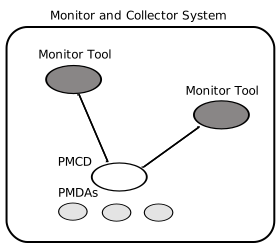
PCP Deployment for a Single System
However, most PCP deployments involve at least two systems. For example, the setup shown in figure_title would be representative of many common scenarios.
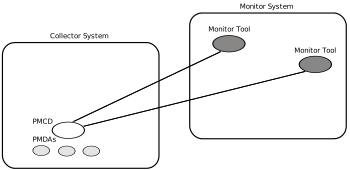
Basic PCP Deployment for Two Systems
But the most common site configuration would include a mixture of systems configured as PCP collectors, as PCP monitors, and as both PCP monitors and collectors, as shown in figure_title.
With one or more PCP collector systems and one or more PCP monitor
systems, there are a number of decisions that need to be made regarding
the deployment of PCP services across multiple hosts. For example, in
figure_title there are several ways in which both the
inference engine (pmie) and the PCP archive logger (pmlogger)
could be deployed. These options are discussed in the following sections
of this chapter.
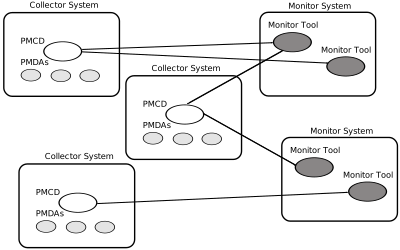
General PCP Deployment for Multiple Systems
PCP Collector Deployment
Each PCP collector system must have an active
pmcd and, typically, a number of PMDAs installed.
Principal Server Deployment
The first hosts selected as PCP collector systems are likely to provide some class of service deemed to be critical to the information processing activities of the enterprise. These hosts include:
- Database servers
- Web servers for an Internet or Intranet presence
- NFS or other central storage server
- A video server
- A supercomputer
- An infrastructure service provider, for example, print, DNS, LDAP, gateway, firewall, router, or mail services
- Any system running a mission-critical application
Your objective may be to improve quality of service on a system functioning as a server for many clients. You wish to identify and repair critical performance bottlenecks and deficiencies in order to maintain maximum performance for clients of the server.
For some of these services, the PCP base product or the PCP add-on packages provide the necessary collector components. Others would require customized PMDA development, as described in the companion Performance Co-Pilot Programmer’s Guide.
Quality of Service Measurement
Applications and services with a client-server architecture need to monitor performance at both the server side and the client side.
The arrangement in figure_title illustrates one way of measuring quality of service for client-server applications.
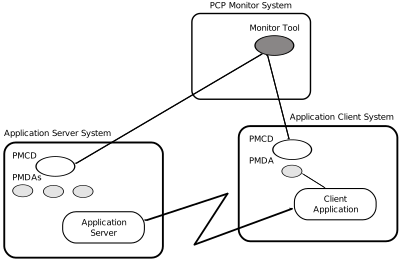
PCP Deployment to Measure Client-Server Quality of Service
The configuration of the PCP collector components on the Application Server System is standard. The new facility is the deployment of some PCP collector components on the Application Client System; this uses a customized PMDA and a generalization of the ICMP “ping” tool as follows:
- The
Client Appis specially developed to periodically make typical requests of theApp Server, and to measure the response time for these requests (this is an application-specific “ping”). - The PMDA on the Application Client System captures the response time
measurements from the
Client Appand exports these into the PCP framework.
At the PCP monitor system, the performance of the system running the
App Server and the end-user quality of service measurements from the
system where the Client App is running can be monitored
concurrently.
PCP contains a number of examples of this architecture, including the
shping PMDA for IP-based services (including HTTP), and the
dbping PMDA for database servers.
The source code for each of these PMDAs is readily available; users and administrators are encouraged to adapt these agents to the needs of the local application environment.
It is possible to exploit this arrangement even further, with these methods:
- Creating new instances of the
Client Appand PMDA to measure service quality for your own mission-critical services. - Deploying the
Client Appand associated PCP collector components in a number of strategic hosts allows the quality of service over the enterprise’s network to be monitored. For example, service can be monitored on the Application Server System, on the same LAN segment as the Application Server System, on the other side of a firewall system, or out in the WAN.
PCP Archive Logger Deployment
PCParchive logger deploymentPCP archive logs are created by the
pmlogger utility, as discussed in Archive
Logging. They provide a critical capability to
perform retrospective performance analysis, for example, to detect
performance regressions, for problem analysis, or to support capacity
planning. The following sections discuss the options and trade-offs for
pmlogger deployment.
Deployment Options
The issue is relatively simple and reduces to “On which host(s) should
pmlogger be running?” The options are these:
Run
pmloggeron each PCP collector system to capture local performance data.Run
pmloggeron some of the PCP monitor systems to capture performance data from remote PCP collector systems.As an extension of the previous option, designate one system to act as the PCP archive site to run all
pmloggerinstances. This arrangement is shown in figure_title.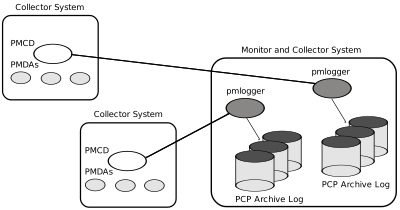
Designated PCP Archive Site
Resource Demands for the Deployment Options
The pmlogger process is very lightweight in terms of computational
demand; most of the (very small) CPU cost is associated with extracting
performance metrics at the PCP collector system (PMCD and the PMDAs),
which are independent of the host on which pmlogger is running.
A local pmlogger consumes disk bandwidth and disk space on the PCP
collector system. A remote pmlogger consumes disk space on the site
where it is running and network bandwidth between that host and the PCP
collector host.
The archive logs typically grow at a rate of anywhere between a few
kilobytes (KB) to tens of megabytes (MB) per day, depending on how many
performance metrics are logged and the choice of sampling frequencies.
There are some advantages in minimizing the number of hosts over which
the disk resources for PCP archive logs must be allocated; however, the
aggregate requirement is independent of where the pmlogger processes
are running.
Operational Management
There is an initial administrative cost associated with configuring each
pmlogger instance, and an ongoing administrative investment to
monitor these configurations, perform regular housekeeping (such as
rotation, compression, and culling of PCP archive log files), and
execute periodic tasks to process the archives (such as nightly
performance regression checking with pmie).
Many of these tasks are handled by the supplied pmlogger
administrative tools and scripts, as described in Archive Log File
Management. However, the necessity and importance
of these tasks favor a centralized pmlogger deployment, as shown in
figure_title.
Exporting PCP Archive Logs
archive logsexportCollecting PCP archive logs is of little value unless the logs are processed as part of the ongoing performance monitoring and management functions. This processing typically involves the use of the tools on a PCP monitor system, and hence the archive logs may need to be read on a host different from the one they were created on.
NFS mounting is obviously an option, but the PCP tools support random access and both forward and backward temporal motion within an archive log. If an archive is to be subjected to intensive and interactive processing, it may be more efficient to copy the files of the archive log to the PCP monitor system first.
Note
Each PCP archive log consists of at least three separate files (see Archive Log File Management for details). You must have concurrent access to all of these files before a PCP tool is able to process an archive log correctly.
PCP Inference Engine Deployment
The pmie utility supports automated reasoning about system
performance, as discussed in Performance Metrics Inference
Engine, and plays a key role in monitoring system
performance for both real-time and retrospective analysis, with the
performance data being retrieved respectively from a PCP collector
system and a PCP archive log.
The following sections discuss the options and trade-offs for pmie
deployment.
Deployment Options
The issue is relatively simple and reduces to “On which host(s) should
pmie be running?” You must consider both real-time and retrospective
uses, and the options are as follows:
- For real-time analysis, run
pmieon each PCP collector system to monitor local system performance. - For real-time analysis, run
pmieon some of the PCP monitor systems to monitor the performance of remote PCP collector systems. - For retrospective analysis, run
pmieon the systems where the PCP archive logs reside. The problem then reduces topmloggerdeployment as discussed in PCP Archive Logger Deployment. - As an example of the “distributed management with centralized
control” philosophy, designate some system to act as the PCP
Management Site to run all
pmloggerandpmieinstances. This arrangement is shown in figure_title.
One pmie instance is capable of monitoring multiple PCP collector
systems; for example, to evaluate some universal rules that apply to all
hosts. At the same time a single PCP collector system may be monitored
by multiple pmie instances; for example, for site-specific and
universal rule evaluation, or to support both tactical performance
management (operations) and strategic performance management (capacity
planning). Both situations are depicted in
figure_title.
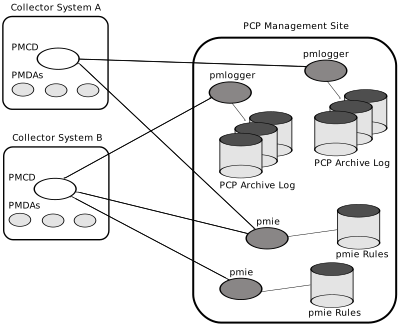
PCP Management Site Deployment
Resource Demands for the Deployment Options
Depending on the complexity of the rule sets, the number of hosts being
monitored, and the evaluation frequency, pmie may consume CPU cycles
significantly above the resources required to simply fetch the values of
the performance metrics. If this becomes significant, then real-time
deployment of pmie away from the PCP collector systems should be
considered in order to avoid the “you’re part of the problem, not the
solution” scenario in terms of CPU utilization on a heavily loaded
server.
Operational Management
An initial administrative cost is associated with configuring each
pmie instance, particularly in the development of the rule sets that
accurately capture and classify “good” versus “bad” performance in your
environment. These rule sets almost always involve some site-specific
knowledge, particularly in respect to the “normal” levels of activity
and resource consumption. The pmieconf tool (see Creating Rules
with) may be used to help develop localized rules
based upon parameterized templates covering many common performance
scenarios. In complex environments, customizing these rules may occur
over an extended period and require considerable performance analysis
insight.
One of the functions of pmie provides for continual detection of
adverse performance and the automatic generation of alarms (visible,
audible, e-mail, pager, and so on). Uncontrolled deployment of this
alarm initiating capability throughout the enterprise may cause havoc.
These considerations favor a centralized pmie deployment at a small
number of PCP monitor sites, or in a PCP Management Site as shown in
figure_title.
However, it is most likely that knowledgeable users with specific needs
may find a local deployment of pmie most useful to track some
particular class of service difficulty or resource utilization. In these
cases, the alarm propagation is unlikely to be required or is confined
to the system on which pmie is running.
Configuration and management of a number of pmie instances is made
much easier with the scripts and control files described in Management
of Processes.
Customizing and Extending PCP Services
Performance Co-Pilot (PCP) has been developed to be fully extensible. The following sections summarize the various facilities provided to allow you to extend and customize PCP for your site:
- PMDA Customization, describes the procedure for customizing the summary PMDA to export derived metrics formed by aggregation of base PCP metrics from one or more collector hosts.
- PCP Tool Customization, describes the various options available for customizing and extending the basic PCP tools.
- PMNS Management, covers the concepts and tools provided for updating the PMNS (Performance Metrics Name Space).
- PMDA Development, details where to find further information to assist in the development of new PMDAs to extend the range of performance metrics available through the PCP infrastructure.
- PCP Tool Development, outlines how new tools may be developed to process performance data from the PCP infrastructure.
PMDA Customization
The generic procedures for installing and activating the optional PMDAs have been described in Managing Optional PMDAs. In some cases, these procedures prompt the user for information based upon the local system or network configuration, application deployment, or processing profile to customize the PMDA and hence the performance metrics it exports.
The summary PMDA is a special case that warrants further discussion.
Customizing the Summary PMDA
The summary PMDA exports performance metrics derived from
performance metrics made available by other PMDAs. It is described
completely in the pmdasummary(1) man page.
The summary PMDA consists of two processes:
pmieprocess- Periodically samples the base metrics and compute values for the
derived metrics. This dedicated instance of the PCP
pmieinference engine is launched with special command line arguments by the main process. See Introduction to, for a complete discussion of thepmiefeature set. mainprocess- Reads and buffers the values computed by the
pmieprocess and makes them available to the Performance Metrics Collection Daemon (PMCD).
All of the metrics exported by the summary PMDA have a singular instance
and the values are instantaneous; the exported value is the correct
value as of the last time the corresponding expression was evaluated by
the pmie process.
The summary PMDA resides in the ${PCP_PMDAS_DIR}/summary directory
and may be installed with a default configuration by following the steps
described in PMDA Installation on a PCP Collector
Host.
Alternatively, you may customize the summary PMDA to export your own derived performance metrics by following the steps in procedure_title:
Check that the symbolic constant SYSSUMMARY is defined in the
${PCP_VAR_DIR}/pmns/stdpmid file. If it is not, perform the
postinstall update of this file, as superuser: cd ${PCP_VAR_DIR}/pmns
./Make.stdpmid
Choose Performance Metric Name Space (PMNS) names for the new
metrics. These must begin with summary and follow the rules
described in the pmns(5) man page. For example, you might use
summary.fs.cache_write and summary.fs.cache_hit.
Edit the pmns file in the ${PCP_PMDAS_DIR}/summary
directory to add the new metric names in the format described in the
pmns(5) man page. You must choose a unique performance metric
identifier (PMID) for each metric. In the pmns file, these appear as
SYSSUMMARY:0:x. The value of x is arbitrary in the range 0 to 1023
and unique in this file. Refer to PMNS Management,
for a further explanation of the rules governing PMNS updates.
For example:
summary {
          cpu
          disk
          netif
          fs              /*new*/
}
summary.fs {
          cache_write     SYSSUMMARY:0:10
          cache_hit       SYSSUMMARY:0:11
}
Use the local test PMNS root and validate that the PMNS changes are
correct.
For example, enter this command:
pminfo -n root -m summary.fs
You see output similar to the following:
summary.fs.cache_write PMID: 27.0.10
summary.fs.cache_hit PMID: 27.0.11
Edit the ${PCP_PMDAS_DIR}/summary/expr.pmie file to add new pmie
expressions. If the name to the left of the assignment operator (=) is
one of the PMNS names, then the pmie expression to the right will be
evaluated and returned by the summary PMDA. The expression must return a
numeric value. Additional description of the pmie expression syntax
may be found in Specification Language for.
For example, consider this expression:
// filesystem buffer cache hit percentages
prefix = "kernel.all.io";          // macro, not exported
summary.fs.cache_write =
                100 - 100 * $prefix.bwrite / $prefix.lwrite;
summary.fs.cache_hit =
                100 - 100 * $prefix.bread / $prefix.lread;
Run pmie in debug mode to verify that the expressions are being
evaluated correctly, and the values make sense.
For example, enter this command:
pmie -t 2sec -v expr.pmie
You see output similar to the following:
summary.fs.cache_write:      ?
summary.fs.cache_hit:      ?
summary.fs.cache_write:  45.83
summary.fs.cache_hit:   83.2
summary.fs.cache_write:  39.22
summary.fs.cache_hit:  84.51
Install the new PMDA.
From the ${PCP_PMDAS_DIR}/summary directory, use this command:
./Install
You see the following output:
Interval between summary expression evaluation (seconds)? [10] 10
Updating the Performance Metrics Name Space...
Installing pmchart view(s) ...
Terminate PMDA if already installed ...
Installing files ..
Updating the PMCD control file, and notifying PMCD ...
Wait 15 seconds for the agent to initialize ...
Check summary metrics have appeared ... 8 metrics and 8 values
Check the metrics.
For example, enter this command:
pmval -t 5sec -s 8 summary.fs.cache_write
You see a response similar to the following:
metric:    summary.fs.cache_write
host:      localhost
semantics: instantaneous value
units:     none
samples:   8
interval:  5.00 sec
63.60132158590308
62.71878646441073
62.71878646441073
58.73968492123031
58.73968492123031
65.33822758259046
65.33822758259046
72.6099706744868
Note that the values are being sampled here by pmval every 5
seconds, but pmie is passing only new values to the summary PMDA
every 10 seconds. Both rates could be changed to suit the dynamics of
your new metrics.
You may now create pmchart views, pmie rules, and pmlogger
configurations to monitor and archive your new performance metrics.
PCP Tool Customization
Performance Co-Pilot (PCP) has been designed and implemented with a philosophy that embraces the notion of toolkits and encourages extensibility.
In most cases, the PCP tools provide orthogonal services, based on external configuration files. It is the creation of new and modified configuration files that enables PCP users to customize tools quickly and meet the needs of the local environment, in many cases allowing personal preferences to be established for individual users on the same PCP monitor system.
The material in this section is intended to act as a checklist of pointers to detailed documentation found elsewhere in this guide, in the man pages, and in the files that are made available as part of the PCP installation.
Archive Logging Customization
The PCP archive logger
is presented in Archive Logging, and documented in
the pmlogger(1) man page.
The following global files and directories influence the behavior of
pmlogger:
${PCP_SYSCONF_DIR}/pmlogger- Enable/disable state for the primary logger facility using this
command:
chkconfig pmlogger on ${PCP_SYSCONF_DIR}/pmlogger/config.default- The default
pmloggerconfiguration file that is used for the primary logger when this facility is enabled. ${PCP_VAR_DIR}/config/pmlogconf/tools- Every PCP tool with a fixed group of performance metrics contributes
a
pmlogconfconfiguration file that includes each of the performance metrics used in the tool, for example,${PCP_VAR_DIR}/config/pmlogconf/pmstatforpmstat. ${PCP_PMLOGGERCONTROL_PATH}or${PCP_PMLOGGERCONTROL_PATH}.dfilesDefines which PCP collector hosts require
pmloggerto be launched on the local host, where the configuration file comes from, where the archive log files should be created, andpmloggerstartup options.These
controlfiles support the starting and stopping of multiplepmloggerinstances that monitor local or remote hosts./etc/cron.d/pcp-pmloggeror${PCP_VAR_DIR}/config/pmlogger/crontab- Default
crontabentries that may be merged with thecrontabentries for thepcpuser to schedule the periodic execution of the archive log management scripts, for example,pmlogger_daily. ${PCP_LOG_DIR}/pmlogger/somehost- The default behavior of the archive log management scripts create archive log files for the host somehost in this directory.
${PCP_LOG_DIR}/pmlogger/somehost/Latest- A PCP archive folio for the most recent archive for the host
somehost. This folio is created and maintained by the
cron-driven periodic archive log management scripts, for example,pmlogger_check. Archive folios may be processed with thepmafmtool.
Inference Engine Customization
The PCP inference engine is
presented in Performance Metrics Inference Engine,
and documented in the pmie(1) man page.
The following global files and directories influence the behavior of
pmie:
${PCP_SYSCONF_DIR}/pmie- Controls the pmie daemon facility. Enable using this command:chkconfig pmie on
${PCP_SYSCONF_DIR}/pmie/config.default- The
pmieconfiguration file that is used for monitoring the local host when thepmiedaemon facility is enabled in the default configuration. This file is created usingpmieconfthe first time the daemon facility is activated. ${PCP_PMIECONTROL_PATH}and${PCP_PMIECONTROL_PATH}.dfilesDefines which PCP collector hosts require a daemon
pmieto be monitoring from the local host, where the configuration files comes from, where thepmielog file should be created, andpmiestartup options.These
controlfiles support the starting and stopping of multiplepmieinstances that are each monitoring one or more hosts.${PCP_VAR_DIR}/config/pmieconf/*/*- Each
pmieconfrule definition can be found below one of these subdirectories. /etc/cron.d/pcp-pmieor${PCP_VAR_DIR}/config/pmie/crontab- Default
crontabentries that may be merged with thecrontabentries for thepcpuser to schedule the periodic execution of thepmie_checkandpmie_dailyscripts, for verifying thatpmieinstances are running and logs rotated. ${PCP_LOG_DIR}/pmie/somehost- The default behavior of the
${PCP_RC_DIR}/pmiestartup scripts createpmielog files for the host somehost in this directory. pmie_checkandpmie_daily- These commands are similar to the
pmloggersupport scripts,pmlogger_checkandpmlogger_daily. ${PCP_TMP_DIR}/pmie- The statistics that
pmiegathers are maintained in binary data structure files. These files can be found in the${PCP_TMP_DIR}/pmiedirectory. pmcd.pmiemetricsThe PMCD PMDA exports information about executing
pmieprocesses and their progress in terms of rule evaluations and action execution rates.If
pmieis running on a system with a PCP collector deployment, thepmcdPMDA exports these metrics via thepmcd.pmiegroup of metrics.
PMNS Management
PMNSmanagementThis section describes the syntax, semantics, and
processing framework for the external specification of a Performance
Metrics Name Space (PMNS) as it might be loaded by the PMAPI routine
pmLoadNameSpace; see the pmLoadNameSpace(3) man page. This is
usually done only by pmcd, except in rare circumstances such as
Customizing the Summary PMDA.
The PMNS specification is a simple text source file that can be edited
easily. For reasons of efficiency, a binary format is also supported;
the utility pmnscomp translates the ASCII source format into binary
format; see the pmnscomp(1) man page.
PMNS Processing Framework
The PMNS specification is initially passed through pmcpp(1). This
means the following facilities may be used in the specification:
- C-style comments
#includedirectives#definedirectives and macro substitution- Conditional processing with
#ifdef,#ifndef,#endif, and#undef
When pmcpp(1) is executed, the standard include directories are the
current directory and ${PCP_VAR_DIR}/pmns, where some standard
macros and default specifications may be found.
PMNS Syntax
PMNSsyntaxsyntaxEvery PMNS is tree structured. The paths to the leaf nodes are the performance metric names. The general syntax for a non-leaf node in PMNS is as follows:
pathname {
        name    [pmid]
        ...
}
Here pathname is the full pathname from the root of the PMNS to this
non-leaf node, with each component in the path separated by a period.
The root node for the PMNS has the special name root, but the prefix
string root. must be omitted from all other pathnames.
For example, refer to the PMNS shown in figure_title.
The correct pathname for the rightmost non-leaf node is
cpu.utilization, not root.cpu.utilization.
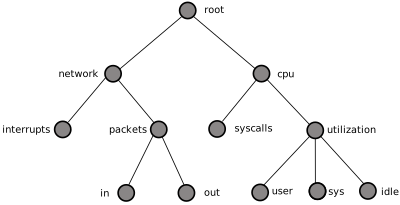
Small Performance Metrics Name Space (PMNS)
Each component in the pathname must begin with an alphabetic character and be followed by zero or more alphanumeric characters or the underscore (_) character. For alphabetic characters in a component, uppercase and lowercase are significant.
Non-leaf nodes in the PMNS may be defined in any order desired. The
descendent nodes are defined by the set of names, relative to the
pathname of their parent non-leaf node. For descendent nodes, leaf nodes
have a pmid specification, but non-leaf nodes do not.
The syntax for the pmid specification was chosen to help manage the
allocation of Performance Metric IDs (PMIDs) across disjoint and
autonomous domains of administration and implementation. Each pmid
consists of three integers separated by colons, for example,
14:27:11. This is intended to mirror the implementation hierarchy of
performance metrics. The first integer identifies the domain in which
the performance metric lies. Within a domain, related metrics are often
grouped into clusters. The second integer identifies the cluster, and
the third integer, the metric within the cluster.
The PMNS specification for figure_title is shown in example_title:
/*
* PMNS Specification
*/
#define KERNEL 1
root {
       network
       cpu
}
#define NETWORK 26
network {
       interrupts    KERNEL:NETWORK:1
       packets
}
network.packets {
       in     KERNEL:NETWORK:35
       out    KERNEL:NETWORK:36
}
#define CPU 10
cpu {
       syscalls    KERNEL:CPU:10
       utilization
}
#define USER 20
#define SYSTEM 21
#define IDLE 22
cpu.utilization {
       user    KERNEL:CPU:USER
       sys     KERNEL:CPU:SYSTEM
       idle    KERNEL:CPU:IDLE
}
For complete documentation of the PMNS and associated utilities, see the
pmns(5), pmnsadd(1), pmnsdel(1) and pmnsmerge(1) man
pages.
PMDA Development
PMDAdevelopmentPerformance Co-Pilot (PCP) is designed to be extensible at the collector site.
Application developers are encouraged to create new PMDAs to export performance metrics from the applications and service layers that are particularly relevant to a specific site, application suite, or processing environment.
These PMDAs use the routines of the libpcp_pmda library, which is
discussed in detail in the Performance Co-Pilot Programmer’s Guide.
PCP Tool Development
PCPtool developmenttool developmentPerformance Co-Pilot (PCP) is designed to be extensible at the monitor site.
Application developers are encouraged to create new PCP client applications to monitor or display performance metrics in a manner that is particularly relevant to a specific site, application suite, or processing environment.
Client applications use the routines of the PMAPI (performance metrics application programming interface) described in the Performance Co-Pilot Programmer’s Guide. At the time of writing, native PMAPI interfaces are available for the C, C++ and Python languages.
Acronyms
Performance Co-Pilot Acronyms and Their Meanings provides a list of the acronyms used in the Performance Co-Pilot (PCP) documentation, help cards, man pages, and user interface.
| Acronym | Meaning |
|---|---|
| API | Application Programming Interface |
| DBMS | Database Management System |
| DNS | Domain Name Service |
| DSO DSO | Dynamic Shared Object |
| I/O I/O | Input/Output |
| IPC IPC | Interprocess Communication |
| PCPacronym PCP | Performance Co-Pilot |
| PDU PDU | Protocol data unit |
| PMAPIacronym PMAPI | Performance Metrics Application Programming Interface |
| PMCDacronym PMCD | Performance Metrics Collection Daemon |
| PMD PMD | Performance Metrics Domain |
| PMDAacronym PMDA | Performance Metrics Domain Agent |
| PMIDacronym PMID | Performance Metric Identifier |
| PMNSacronym PMNS | Performance Metrics Name Space |
| TCP/IPacronym TCP/IP | Transmission Control Protocol/Internet Protocol |